
Argo meta-data#
Index of profiles#
Since the Argo measurements dataset is quite complex, it comes with a collection of index files, or lookup tables with meta data. These index help you determine what you can expect before retrieving the full set of measurements.
argopy provides two methods to work with Argo index files: one is high-level and works like the data fetcher, the other is low-level and works like a “store”.
Fetcher: High-level Argo index access#
argopy has a specific fetcher for index files:
In [1]: from argopy import IndexFetcher as ArgoIndexFetcher
You can use the Index fetcher with the region or float access points, similarly to data fetching:
In [2]: idx = ArgoIndexFetcher(src='gdac').float(2901623).load()

In [3]: idx.index
Out[3]:
                                       file  ... profiler
0    nmdis/2901623/profiles/R2901623_000.nc  ...  Unknown
1   nmdis/2901623/profiles/R2901623_000D.nc  ...  Unknown
2    nmdis/2901623/profiles/R2901623_001.nc  ...  Unknown
3    nmdis/2901623/profiles/R2901623_002.nc  ...  Unknown
4    nmdis/2901623/profiles/R2901623_003.nc  ...  Unknown
..                                      ...  ...      ...
93   nmdis/2901623/profiles/R2901623_092.nc  ...  Unknown
94   nmdis/2901623/profiles/R2901623_093.nc  ...  Unknown
95   nmdis/2901623/profiles/R2901623_094.nc  ...  Unknown
96   nmdis/2901623/profiles/R2901623_095.nc  ...  Unknown
97   nmdis/2901623/profiles/R2901623_096.nc  ...  Unknown

[98 rows x 12 columns]
Alternatively, you can use argopy.IndexFetcher.to_dataframe():
In [4]: idx = ArgoIndexFetcher(src='gdac').float(2901623)

In [5]: df = idx.to_dataframe()
The difference is that with the load method, data are stored in memory and not fetched on every call to the index attribute.
The index fetcher has pretty much the same methods than the data fetchers. You can check them all here: argopy.fetchers.ArgoIndexFetcher.
Store: Low-level Argo Index access#
The IndexFetcher shown above is a user-friendly layer on top of our internal Argo index file store. But if you are familiar with Argo index files and/or cares about performances, you may be interested in using directly the Argo index store ArgoIndex.
If Pyarrow is installed, this store will rely on pyarrow.Table as internal storage format for the index, otherwise it will fall back on pandas.DataFrame. Loading the full Argo profile index takes about 2/3 secs with Pyarrow, while it can take up to 6/7 secs with Pandas.
All index store methods and properties are documented in ArgoIndex.
Index file supported#
The table below summarize the argopy support status of all Argo index files:
Index file |
Supported |
|
|---|---|---|
Profile |
ar_index_global_prof.txt |
✅ |
Synthetic-Profile |
argo_synthetic-profile_index.txt |
✅ |
Bio-Profile |
argo_bio-profile_index.txt |
✅ |
Trajectory |
ar_index_global_traj.txt |
❌ |
Bio-Trajectory |
argo_bio-traj_index.txt |
❌ |
Metadata |
ar_index_global_meta.txt |
❌ |
Technical |
ar_index_global_tech.txt |
❌ |
Greylist |
ar_greylist.txt |
❌ |
Index files support can be added on demand. Click here to raise an issue if you’d like to access other index files.
Usage#
You create an index store with default or custom options:
In [6]: from argopy import ArgoIndex

In [7]: idx = ArgoIndex()

# or:
# ArgoIndex(index_file="argo_bio-profile_index.txt")
# ArgoIndex(index_file="bgc-s")  # can use keyword instead of file name: core, bgc-b, bgc-b
# ArgoIndex(host="ftp://ftp.ifremer.fr/ifremer/argo")
# ArgoIndex(host="https://data-argo.ifremer.fr", index_file="core")
# ArgoIndex(host="https://data-argo.ifremer.fr", index_file="ar_index_global_prof.txt", cache=True)
You can then trigger loading of the index content:
In [8]: idx.load()  # Load the full index in memory
Out[8]:
<argoindex.pandas>
Host: https://data-argo.ifremer.fr
Index: ar_index_global_prof.txt
Convention: ar_index_global_prof (Profile directory file of the Argo GDAC)
Loaded: True (3021683 records)
Searched: False
Here is the list of methods and properties of the full index:
idx.load(nrows=12)  # Only load the first N rows of the index
idx.N_RECORDS  # Shortcut for length of 1st dimension of the index array
idx.to_dataframe(index=True)  # Convert index to user-friendly :class:`pandas.DataFrame`
idx.to_dataframe(index=True, nrows=2)  # Only returns the first nrows of the index
idx.index  # internal storage structure of the full index (:class:`pyarrow.Table` or :class:`pandas.DataFrame`)
idx.uri_full_index  # List of absolute path to files from the full index table column 'file'
They are several methods to search the index, for instance:
In [9]: idx.search_lat_lon_tim([-60, -55, 40., 45., '2007-08-01', '2007-09-01'])
Out[9]:
<argoindex.pandas>
Host: https://data-argo.ifremer.fr
Index: ar_index_global_prof.txt
Convention: ar_index_global_prof (Profile directory file of the Argo GDAC)
Loaded: True (3021683 records)
Searched: True (12 matches, 0.0004%)
Here the list of all methods to search the index:
idx.search_wmo(1901393)
idx.search_cyc(1)
idx.search_wmo_cyc(1901393, [1,12])
idx.search_tim([-60, -55, 40., 45., '2007-08-01', '2007-09-01'])  # Take an index BOX definition, only time is used
idx.search_lat_lon([-60, -55, 40., 45., '2007-08-01', '2007-09-01'])  # Take an index BOX definition, only lat/lon is used
idx.search_lat_lon_tim([-60, -55, 40., 45., '2007-08-01', '2007-09-01'])  # Take an index BOX definition
idx.search_params(['C1PHASE_DOXY', 'DOWNWELLING_PAR'])  # Only for BGC profile index
idx.search_parameter_data_mode({'BBP700': 'D'})  # Only for BGC profile index
And finally the list of methods and properties for search results:
idx.N_MATCH  # Shortcut for length of 1st dimension of the search results array
idx.to_dataframe()  # Convert search results to user-friendly :class:`pandas.DataFrame`
idx.to_dataframe(nrows=2)  # Only returns the first nrows of the search results
idx.to_indexfile("search_index.txt")  # Export search results to Argo standard index file
idx.search  # Internal table with search results
idx.uri  # List of absolute path to files from the search results table column 'file'
Usage with bgc index#
The argopy index store supports the Bio and Synthetic Profile directory files:
In [10]: idx = ArgoIndex(index_file="argo_bio-profile_index.txt").load()

# idx = ArgoIndex(index_file="argo_synthetic-profile_index.txt").load()
In [11]: idx
Out[11]:
<argoindex.pandas>
Host: https://data-argo.ifremer.fr
Index: argo_bio-profile_index.txt
Convention: argo_bio-profile_index (Bio-Profile directory file of the Argo GDAC)
Loaded: True (322000 records)
Searched: False
Hint
In order to load one BGC-Argo profile index, you can use either bgc-b or bgc-s keywords to load the argo_bio-profile_index.txt or argo_synthetic-profile_index.txt index files.
All methods presented above are valid with BGC index, but a BGC index store comes with additional search possibilities for parameters and parameter data modes.
Two specific index variables are only available with BGC-Argo index files: PARAMETERS and PARAMETER_DATA_MODE. We thus implemented the ArgoIndex.search_params() and ArgoIndex.search_parameter_data_mode() methods. These method allow to search for (i) profiles with one or more specific parameters and (ii) profiles with parameters in one or more specific data modes.
Syntax for ArgoIndex.search_params()
In [12]: from argopy import ArgoIndex

In [13]: idx = ArgoIndex(index_file='bgc-s').load()

In [14]: idx
Out[14]:
<argoindex.pandas>
Host: https://data-argo.ifremer.fr
Index: argo_synthetic-profile_index.txt
Convention: argo_synthetic-profile_index (Synthetic-Profile directory file of the Argo GDAC)
Loaded: True (320489 records)
Searched: False
You can search for one parameter:
In [15]: idx.search_params('DOXY')
Out[15]:
<argoindex.pandas>
Host: https://data-argo.ifremer.fr
Index: argo_synthetic-profile_index.txt
Convention: argo_synthetic-profile_index (Synthetic-Profile directory file of the Argo GDAC)
Loaded: True (320489 records)
Searched: True (306874 matches, 95.7518%)
Or you can search for several parameters:
In [16]: idx.search_params(['DOXY', 'CDOM'])
Out[16]:
<argoindex.pandas>
Host: https://data-argo.ifremer.fr
Index: argo_synthetic-profile_index.txt
Convention: argo_synthetic-profile_index (Synthetic-Profile directory file of the Argo GDAC)
Loaded: True (320489 records)
Searched: True (51438 matches, 16.0498%)
Note that a multiple parameters search will return profiles with all parameters. To search for profiles with any of the parameters, use:
In [17]: idx.search_params(['DOXY', 'CDOM'], logical='or')
Out[17]:
<argoindex.pandas>
Host: https://data-argo.ifremer.fr
Index: argo_synthetic-profile_index.txt
Convention: argo_synthetic-profile_index (Synthetic-Profile directory file of the Argo GDAC)
Loaded: True (320489 records)
Searched: True (319193 matches, 99.5956%)
Syntax for ArgoIndex.search_parameter_data_mode()
In [18]: from argopy import ArgoIndex

In [19]: idx = ArgoIndex(index_file='bgc-b').load()

In [20]: idx
Out[20]:
<argoindex.pandas>
Host: https://data-argo.ifremer.fr
Index: argo_bio-profile_index.txt
Convention: argo_bio-profile_index (Bio-Profile directory file of the Argo GDAC)
Loaded: True (322000 records)
Searched: False
You can search one mode for a single parameter:
In [21]: idx.search_parameter_data_mode({'BBP700': 'D'})
Out[21]:
<argoindex.pandas>
Host: https://data-argo.ifremer.fr
Index: argo_bio-profile_index.txt
Convention: argo_bio-profile_index (Bio-Profile directory file of the Argo GDAC)
Loaded: True (322000 records)
Searched: True (17529 matches, 5.4438%)
You can search several modes for a single parameter:
In [22]: idx.search_parameter_data_mode({'DOXY': ['R', 'A']})
Out[22]:
<argoindex.pandas>
Host: https://data-argo.ifremer.fr
Index: argo_bio-profile_index.txt
Convention: argo_bio-profile_index (Bio-Profile directory file of the Argo GDAC)
Loaded: True (322000 records)
Searched: True (104295 matches, 32.3898%)
You can search several modes for several parameters:
In [23]: idx.search_parameter_data_mode({'BBP700': 'D', 'DOXY': 'D'}, logical='and')
Out[23]:
<argoindex.pandas>
Host: https://data-argo.ifremer.fr
Index: argo_bio-profile_index.txt
Convention: argo_bio-profile_index (Bio-Profile directory file of the Argo GDAC)
Loaded: True (322000 records)
Searched: True (11292 matches, 3.5068%)
And mix all of these as you wish:
In [24]: idx.search_parameter_data_mode({'BBP700': ['R', 'A'], 'DOXY': 'D'}, logical='or')
Out[24]:
<argoindex.pandas>
Host: https://data-argo.ifremer.fr
Index: argo_bio-profile_index.txt
Convention: argo_bio-profile_index (Bio-Profile directory file of the Argo GDAC)
Loaded: True (322000 records)
Searched: True (242589 matches, 75.3382%)
Reference tables#
The Argo netcdf format is strict and based on a collection of variables fully documented and conventioned. All reference tables can be found in the Argo user manual.
However, a machine-to-machine access to these tables is often required. This is possible thanks to the work of the Argo Vocabulary Task Team (AVTT) that is a team of people responsible for the NVS collections under the Argo Data Management Team governance.
Note
The GitHub organization hosting the AVTT is the ‘NERC Vocabulary Server (NVS)’, aka ‘nvs-vocabs’. This holds a list of NVS collection-specific GitHub repositories. Each Argo GitHub repository is called after its corresponding collection ID (e.g. R01, RR2, R03 etc.). The current list is given here.
The management of issues related to vocabularies managed by the Argo Data Management Team is done on this repository.
argopy provides the utility class ArgoNVSReferenceTables to easily fetch and get access to all Argo reference tables. If you already know the name of the reference table you want to retrieve, you can simply get it like this:
In [25]: from argopy import ArgoNVSReferenceTables

In [26]: NVS = ArgoNVSReferenceTables()

In [27]: NVS.tbl('R01')
---------------------------------------------------------------------------
KeyError                                  Traceback (most recent call last)
Cell In[27], line 1
----> 1 NVS.tbl('R01')

File ~/checkouts/readthedocs.org/user_builds/argopy/checkouts/v0.1.15/argopy/related/reference_tables.py:165, in ArgoNVSReferenceTables.tbl(self, rtid)
    163 rtid = self._valid_ref(rtid)
    164 js = self.fs.open_json(self.get_url(rtid))
--> 165 df = self._jsConcept2df(js)
    166 return df

File ~/checkouts/readthedocs.org/user_builds/argopy/checkouts/v0.1.15/argopy/related/reference_tables.py:104, in ArgoNVSReferenceTables._jsConcept2df(self, data)
    102     Collection_name = k["alternative"]
    103 elif k["@type"] == "skos:Concept":
--> 104     content["altLabel"].append(k["altLabel"])
    105     content["prefLabel"].append(k["prefLabel"]["@value"])
    106     content["definition"].append(k["definition"]["@value"])

KeyError: 'altLabel'
The reference table is returned as a pandas.DataFrame. If you want the exact name of this table:
In [28]: NVS.tbl_name('R01')
---------------------------------------------------------------------------
KeyError                                  Traceback (most recent call last)
Cell In[28], line 1
----> 1 NVS.tbl_name('R01')

File ~/checkouts/readthedocs.org/user_builds/argopy/checkouts/v0.1.15/argopy/related/reference_tables.py:182, in ArgoNVSReferenceTables.tbl_name(self, rtid)
    180 rtid = self._valid_ref(rtid)
    181 js = self.fs.open_json(self.get_url(rtid))
--> 182 return self._jsCollection(js)

File ~/checkouts/readthedocs.org/user_builds/argopy/checkouts/v0.1.15/argopy/related/reference_tables.py:117, in ArgoNVSReferenceTables._jsCollection(self, data)
    115 for k in data["@graph"]:
    116     if k["@type"] == "skos:Collection":
--> 117         name = k["alternative"]
    118         desc = k["description"]
    119         rtid = k["@id"]

KeyError: 'alternative'
If you don’t know the reference table ID, you can search for a word in tables title and/or description with the search method:
In [29]: id_list = NVS.search('sensor')
---------------------------------------------------------------------------
DataNotFound                              Traceback (most recent call last)
Cell In[29], line 1
----> 1 id_list = NVS.search('sensor')

File ~/checkouts/readthedocs.org/user_builds/argopy/checkouts/v0.1.15/argopy/related/reference_tables.py:198, in ArgoNVSReferenceTables.search(self, txt, where)
    185 """Search for string in tables title and/or description
    186
    187 Parameters
   (...)
    195 list of table id matching the search
    196 """
    197 results = []
--> 198 for tbl_id in self.all_tbl_name:
    199     title = self.tbl_name(tbl_id)[0]
    200     description = self.tbl_name(tbl_id)[1]

File ~/checkouts/readthedocs.org/user_builds/argopy/checkouts/v0.1.15/argopy/related/reference_tables.py:238, in ArgoNVSReferenceTables.all_tbl_name(self)
    230 """Return names of all Argo Reference tables
    231
    232 Returns
   (...)
    235     Dictionary with all table short names as key and table names as tuple('short name', 'description', 'NVS id link')
    236 """
    237 URLs = [self.get_url(rtid) for rtid in self.valid_ref]
--> 238 name_list = self.fs.open_mfjson(URLs, preprocess=self._jsCollection)
    239 all_tables = {}
    240 [
    241     all_tables.update({rtid.split("/")[-3]: (name, desc, rtid)})
    242     for name, desc, rtid in name_list
    243 ]

File ~/checkouts/readthedocs.org/user_builds/argopy/checkouts/v0.1.15/argopy/stores/filesystems.py:1396, in httpstore.open_mfjson(self, urls, max_workers, method, progress, preprocess, url_follow, errors, *args, **kwargs)
   1394     return results
   1395 else:
-> 1396     raise DataNotFound(urls)

DataNotFound: "['https://vocab.nerc.ac.uk/collection/R01/current/?_profile=nvs&_mediatype=application/ld+json', 'https://vocab.nerc.ac.uk/collection/RR2/current/?_profile=nvs&_mediatype=application/ld+json', 'https://vocab.nerc.ac.uk/collection/RD2/current/?_profile=nvs&_mediatype=application/ld+json', 'https://vocab.nerc.ac.uk/collection/RP2/current/?_profile=nvs&_mediatype=application/ld+json', 'https://vocab.nerc.ac.uk/collection/R03/current/?_profile=nvs&_mediatype=application/ld+json', 'https://vocab.nerc.ac.uk/collection/R04/current/?_profile=nvs&_mediatype=application/ld+json', 'https://vocab.nerc.ac.uk/collection/R05/current/?_profile=nvs&_mediatype=application/ld+json', 'https://vocab.nerc.ac.uk/collection/R06/current/?_profile=nvs&_mediatype=application/ld+json', 'https://vocab.nerc.ac.uk/collection/R07/current/?_profile=nvs&_mediatype=application/ld+json', 'https://vocab.nerc.ac.uk/collection/R08/current/?_profile=nvs&_mediatype=application/ld+json', 'https://vocab.nerc.ac.uk/collection/R09/current/?_profile=nvs&_mediatype=application/ld+json', 'https://vocab.nerc.ac.uk/collection/R10/current/?_profile=nvs&_mediatype=application/ld+json', 'https://vocab.nerc.ac.uk/collection/R11/current/?_profile=nvs&_mediatype=application/ld+json', 'https://vocab.nerc.ac.uk/collection/R12/current/?_profile=nvs&_mediatype=application/ld+json', 'https://vocab.nerc.ac.uk/collection/R13/current/?_profile=nvs&_mediatype=application/ld+json', 'https://vocab.nerc.ac.uk/collection/R15/current/?_profile=nvs&_mediatype=application/ld+json', 'https://vocab.nerc.ac.uk/collection/RMC/current/?_profile=nvs&_mediatype=application/ld+json', 'https://vocab.nerc.ac.uk/collection/RTV/current/?_profile=nvs&_mediatype=application/ld+json', 'https://vocab.nerc.ac.uk/collection/R16/current/?_profile=nvs&_mediatype=application/ld+json', 'https://vocab.nerc.ac.uk/collection/R18/current/?_profile=nvs&_mediatype=application/ld+json', 'https://vocab.nerc.ac.uk/collection/R19/current/?_profile=nvs&_mediatype=application/ld+json', 'https://vocab.nerc.ac.uk/collection/R20/current/?_profile=nvs&_mediatype=application/ld+json', 'https://vocab.nerc.ac.uk/collection/R21/current/?_profile=nvs&_mediatype=application/ld+json', 'https://vocab.nerc.ac.uk/collection/R22/current/?_profile=nvs&_mediatype=application/ld+json', 'https://vocab.nerc.ac.uk/collection/R23/current/?_profile=nvs&_mediatype=application/ld+json', 'https://vocab.nerc.ac.uk/collection/R24/current/?_profile=nvs&_mediatype=application/ld+json', 'https://vocab.nerc.ac.uk/collection/R25/current/?_profile=nvs&_mediatype=application/ld+json', 'https://vocab.nerc.ac.uk/collection/R26/current/?_profile=nvs&_mediatype=application/ld+json', 'https://vocab.nerc.ac.uk/collection/R27/current/?_profile=nvs&_mediatype=application/ld+json', 'https://vocab.nerc.ac.uk/collection/R28/current/?_profile=nvs&_mediatype=application/ld+json', 'https://vocab.nerc.ac.uk/collection/R29/current/?_profile=nvs&_mediatype=application/ld+json', 'https://vocab.nerc.ac.uk/collection/R30/current/?_profile=nvs&_mediatype=application/ld+json', 'https://vocab.nerc.ac.uk/collection/R40/current/?_profile=nvs&_mediatype=application/ld+json']"
This will return the list of reference table ids matching your search. It can then be used to retrieve table information:
In [30]: [NVS.tbl_name(id) for id in id_list]
---------------------------------------------------------------------------
NameError                                 Traceback (most recent call last)
Cell In[30], line 1
----> 1 [NVS.tbl_name(id) for id in id_list]

NameError: name 'id_list' is not defined
The full list of all available tables is given by the ArgoNVSReferenceTables.all_tbl_name() property. It will return a dictionary with table IDs as key and table name, definition and NVS link as values. Use the ArgoNVSReferenceTables.all_tbl() property to retrieve all tables.
In [31]: NVS.all_tbl_name
---------------------------------------------------------------------------
DataNotFound                              Traceback (most recent call last)
Cell In[31], line 1
----> 1 NVS.all_tbl_name

File ~/checkouts/readthedocs.org/user_builds/argopy/checkouts/v0.1.15/argopy/related/reference_tables.py:238, in ArgoNVSReferenceTables.all_tbl_name(self)
    230 """Return names of all Argo Reference tables
    231
    232 Returns
   (...)
    235     Dictionary with all table short names as key and table names as tuple('short name', 'description', 'NVS id link')
    236 """
    237 URLs = [self.get_url(rtid) for rtid in self.valid_ref]
--> 238 name_list = self.fs.open_mfjson(URLs, preprocess=self._jsCollection)
    239 all_tables = {}
    240 [
    241     all_tables.update({rtid.split("/")[-3]: (name, desc, rtid)})
    242     for name, desc, rtid in name_list
    243 ]

File ~/checkouts/readthedocs.org/user_builds/argopy/checkouts/v0.1.15/argopy/stores/filesystems.py:1396, in httpstore.open_mfjson(self, urls, max_workers, method, progress, preprocess, url_follow, errors, *args, **kwargs)
   1394     return results
   1395 else:
-> 1396     raise DataNotFound(urls)

DataNotFound: "['https://vocab.nerc.ac.uk/collection/R01/current/?_profile=nvs&_mediatype=application/ld+json', 'https://vocab.nerc.ac.uk/collection/RR2/current/?_profile=nvs&_mediatype=application/ld+json', 'https://vocab.nerc.ac.uk/collection/RD2/current/?_profile=nvs&_mediatype=application/ld+json', 'https://vocab.nerc.ac.uk/collection/RP2/current/?_profile=nvs&_mediatype=application/ld+json', 'https://vocab.nerc.ac.uk/collection/R03/current/?_profile=nvs&_mediatype=application/ld+json', 'https://vocab.nerc.ac.uk/collection/R04/current/?_profile=nvs&_mediatype=application/ld+json', 'https://vocab.nerc.ac.uk/collection/R05/current/?_profile=nvs&_mediatype=application/ld+json', 'https://vocab.nerc.ac.uk/collection/R06/current/?_profile=nvs&_mediatype=application/ld+json', 'https://vocab.nerc.ac.uk/collection/R07/current/?_profile=nvs&_mediatype=application/ld+json', 'https://vocab.nerc.ac.uk/collection/R08/current/?_profile=nvs&_mediatype=application/ld+json', 'https://vocab.nerc.ac.uk/collection/R09/current/?_profile=nvs&_mediatype=application/ld+json', 'https://vocab.nerc.ac.uk/collection/R10/current/?_profile=nvs&_mediatype=application/ld+json', 'https://vocab.nerc.ac.uk/collection/R11/current/?_profile=nvs&_mediatype=application/ld+json', 'https://vocab.nerc.ac.uk/collection/R12/current/?_profile=nvs&_mediatype=application/ld+json', 'https://vocab.nerc.ac.uk/collection/R13/current/?_profile=nvs&_mediatype=application/ld+json', 'https://vocab.nerc.ac.uk/collection/R15/current/?_profile=nvs&_mediatype=application/ld+json', 'https://vocab.nerc.ac.uk/collection/RMC/current/?_profile=nvs&_mediatype=application/ld+json', 'https://vocab.nerc.ac.uk/collection/RTV/current/?_profile=nvs&_mediatype=application/ld+json', 'https://vocab.nerc.ac.uk/collection/R16/current/?_profile=nvs&_mediatype=application/ld+json', 'https://vocab.nerc.ac.uk/collection/R18/current/?_profile=nvs&_mediatype=application/ld+json', 'https://vocab.nerc.ac.uk/collection/R19/current/?_profile=nvs&_mediatype=application/ld+json', 'https://vocab.nerc.ac.uk/collection/R20/current/?_profile=nvs&_mediatype=application/ld+json', 'https://vocab.nerc.ac.uk/collection/R21/current/?_profile=nvs&_mediatype=application/ld+json', 'https://vocab.nerc.ac.uk/collection/R22/current/?_profile=nvs&_mediatype=application/ld+json', 'https://vocab.nerc.ac.uk/collection/R23/current/?_profile=nvs&_mediatype=application/ld+json', 'https://vocab.nerc.ac.uk/collection/R24/current/?_profile=nvs&_mediatype=application/ld+json', 'https://vocab.nerc.ac.uk/collection/R25/current/?_profile=nvs&_mediatype=application/ld+json', 'https://vocab.nerc.ac.uk/collection/R26/current/?_profile=nvs&_mediatype=application/ld+json', 'https://vocab.nerc.ac.uk/collection/R27/current/?_profile=nvs&_mediatype=application/ld+json', 'https://vocab.nerc.ac.uk/collection/R28/current/?_profile=nvs&_mediatype=application/ld+json', 'https://vocab.nerc.ac.uk/collection/R29/current/?_profile=nvs&_mediatype=application/ld+json', 'https://vocab.nerc.ac.uk/collection/R30/current/?_profile=nvs&_mediatype=application/ld+json', 'https://vocab.nerc.ac.uk/collection/R40/current/?_profile=nvs&_mediatype=application/ld+json']"
Deployment Plan#
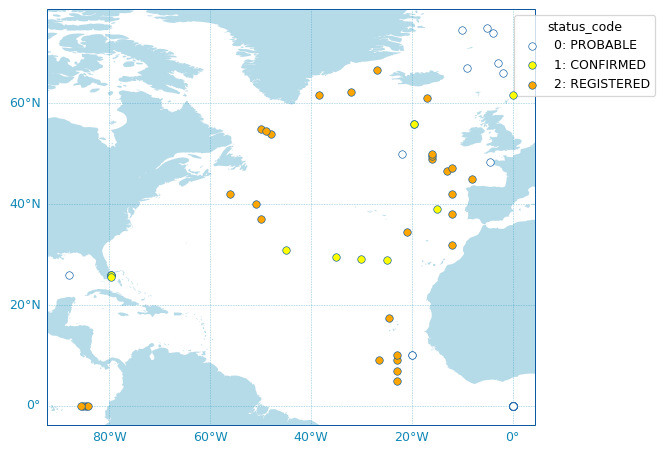
It may be useful to be able to retrieve meta-data from Argo deployments. argopy can use the OceanOPS API for metadata access to retrieve these information. The returned deployment plan is a list of all Argo floats ever deployed, together with their deployment location, date, WMO, program, country, float model and current status.
To fetch the Argo deployment plan, argopy provides a dedicated utility class: OceanOPSDeployments that can be used like this:
In [32]: from argopy import OceanOPSDeployments

In [33]: deployment = OceanOPSDeployments()

In [34]: df = deployment.to_dataframe()

In [35]: df
Out[35]:
                   date   lat    lon  ...     program      country    model
0   2024-08-30 14:33:56  17.0  130.0  ...  Argo KIOST  SOUTH KOREA  ARVOR_L
1   2024-08-30 14:33:56  17.0  130.0  ...  Argo KIOST  SOUTH KOREA  ARVOR_L
2   2024-08-30 14:33:56  17.0  130.0  ...  Argo KIOST  SOUTH KOREA  ARVOR_L
3   2024-08-30 14:33:56  17.0  130.0  ...  Argo KIOST  SOUTH KOREA  ARVOR_L
4   2024-08-30 14:33:56  17.0  130.0  ...  Argo KIOST  SOUTH KOREA  ARVOR_L
..                  ...   ...    ...  ...         ...          ...      ...
337 2028-05-02 12:00:01  35.0   19.0  ...  Argo ITALY        ITALY    ARVOR
338 2028-05-02 12:00:01  35.0   20.0  ...  Argo ITALY        ITALY    ARVOR
339 2028-05-02 12:00:01  35.0   20.5  ...  Argo ITALY        ITALY    ARVOR
340 2028-05-20 12:00:00  35.0   16.0  ...  Argo ITALY        ITALY    ARVOR
341 2028-05-20 12:00:00  35.0   19.5  ...  Argo ITALY        ITALY    ARVOR

[342 rows x 9 columns]
OceanOPSDeployments can also take an index box definition as argument in order to restrict the deployment plan selection to a specific region or period:
deployment = OceanOPSDeployments([-90, 0, 0, 90])
# deployment = OceanOPSDeployments([-20, 0, 42, 51, '2020-01', '2021-01'])
# deployment = OceanOPSDeployments([-180, 180, -90, 90, '2020-01', None])
Note that if the starting date is not provided, it will be set automatically to the current date.
Last, OceanOPSDeployments comes with a plotting method:
fig, ax = deployment.plot_status()
Note
The list of possible deployment status name/code is given by:
OceanOPSDeployments().status_code
Status |
Id |
Description |
|---|---|---|
PROBABLE |
0 |
Starting status for some platforms, when there is only a few metadata available, like rough deployment location and date. The platform may be deployed |
CONFIRMED |
1 |
Automatically set when a ship is attached to the deployment information. The platform is ready to be deployed, deployment is planned |
REGISTERED |
2 |
Starting status for most of the networks, when deployment planning is not done. The deployment is certain, and a notification has been sent via the OceanOPS system |
OPERATIONAL |
6 |
Automatically set when the platform is emitting a pulse and observations are distributed within a certain time interval |
INACTIVE |
4 |
The platform is not emitting a pulse since a certain time |
CLOSED |
5 |
The platform is not emitting a pulse since a long time, it is considered as dead |
ADMT Documentation#
More than 20 pdf manuals have been produced by the Argo Data Management Team. Using the ArgoDocs class, it’s easy to navigate this great database.
If you don’t know where to start, you can simply list all available documents:
In [36]: from argopy import ArgoDocs

In [37]: ArgoDocs().list
Out[37]:
             category  ...     id
0   Argo data formats  ...  29825
1     Quality control  ...  33951
2     Quality control  ...  46542
3     Quality control  ...  40879
4     Quality control  ...  35385
5     Quality control  ...  84370
6     Quality control  ...  62466
7           Cookbooks  ...  41151
8           Cookbooks  ...  29824
9           Cookbooks  ...  78994
10          Cookbooks  ...  39795
11          Cookbooks  ...  39459
12          Cookbooks  ...  39468
13          Cookbooks  ...  47998
14          Cookbooks  ...  54541
15          Cookbooks  ...  46121
16          Cookbooks  ...  51541
17          Cookbooks  ...  57195
18          Cookbooks  ...  46120
19          Cookbooks  ...  52154
20          Cookbooks  ...  55637
21          Cookbooks  ...  46202
22          Cookbooks  ...  57195
23          Cookbooks  ...  46121

[24 rows x 4 columns]
Or search for a word in the title and/or abstract:
In [38]: results = ArgoDocs().search("oxygen")

In [39]: for docid in results:
   ....:     print("\n", ArgoDocs(docid))
   ....:

 ---------------------------------------------------------------------------
TypeError                                 Traceback (most recent call last)
Cell In[39], line 2
      1 for docid in results:
----> 2     print("\n", ArgoDocs(docid))

File ~/checkouts/readthedocs.org/user_builds/argopy/checkouts/v0.1.15/argopy/related/argo_documentation.py:108, in ArgoDocs.__repr__(self)
    106 summary.append("DOI: %s" % doc['doi'])
    107 summary.append("url: https://dx.doi.org/%s" % doc['doi'])
--> 108 summary.append("last pdf: %s" % self.pdf)
    109 if 'AF' in self.ris:
    110     summary.append("Authors: %s" % self.ris['AF'])

File ~/checkouts/readthedocs.org/user_builds/argopy/checkouts/v0.1.15/argopy/related/argo_documentation.py:160, in ArgoDocs.pdf(self)
    158 """Link to the online pdf version of a document"""
    159 if self.docid is not None:
--> 160     return self.ris['UR']
    161 else:
    162     raise ValueError("Select a document first !")

File ~/checkouts/readthedocs.org/user_builds/argopy/checkouts/v0.1.15/argopy/related/argo_documentation.py:141, in ArgoDocs.ris(self)
    138 file = self._fs.download_url("%s/%s" % (self._doiserver, self.js['doi']))
    139 x = re.search(r'<a target="_blank" href="(https?:\/\/([^"]*))"\s+([^>]*)rel="nofollow">TXT<\/a>',
    140               str(file))
--> 141 export_txt_url = x[1].replace("https://archimer.ifremer.fr", self._archimer)
    142 self._risfile = export_txt_url
    143 self._ris = self.RIS(export_txt_url, fs=self._fs).record

TypeError: 'NoneType' object is not subscriptable
Then using the Argo doi number of a document, you can easily retrieve it:
In [40]: ArgoDocs(35385)
Out[40]: ---------------------------------------------------------------------------
TypeError                                 Traceback (most recent call last)
File ~/checkouts/readthedocs.org/user_builds/argopy/envs/v0.1.15/lib/python3.8/site-packages/IPython/core/formatters.py:708, in PlainTextFormatter.__call__(self, obj)
    701 stream = StringIO()
    702 printer = pretty.RepresentationPrinter(stream, self.verbose,
    703     self.max_width, self.newline,
    704     max_seq_length=self.max_seq_length,
    705     singleton_pprinters=self.singleton_printers,
    706     type_pprinters=self.type_printers,
    707     deferred_pprinters=self.deferred_printers)
--> 708 printer.pretty(obj)
    709 printer.flush()
    710 return stream.getvalue()

File ~/checkouts/readthedocs.org/user_builds/argopy/envs/v0.1.15/lib/python3.8/site-packages/IPython/lib/pretty.py:410, in RepresentationPrinter.pretty(self, obj)
    407                         return meth(obj, self, cycle)
    408                 if cls is not object \
    409                         and callable(cls.__dict__.get('__repr__')):
--> 410                     return _repr_pprint(obj, self, cycle)
    412     return _default_pprint(obj, self, cycle)
    413 finally:

File ~/checkouts/readthedocs.org/user_builds/argopy/envs/v0.1.15/lib/python3.8/site-packages/IPython/lib/pretty.py:778, in _repr_pprint(obj, p, cycle)
    776 """A pprint that just redirects to the normal repr function."""
    777 # Find newlines and replace them with p.break_()
--> 778 output = repr(obj)
    779 lines = output.splitlines()
    780 with p.group():

File ~/checkouts/readthedocs.org/user_builds/argopy/checkouts/v0.1.15/argopy/related/argo_documentation.py:108, in ArgoDocs.__repr__(self)
    106 summary.append("DOI: %s" % doc['doi'])
    107 summary.append("url: https://dx.doi.org/%s" % doc['doi'])
--> 108 summary.append("last pdf: %s" % self.pdf)
    109 if 'AF' in self.ris:
    110     summary.append("Authors: %s" % self.ris['AF'])

File ~/checkouts/readthedocs.org/user_builds/argopy/checkouts/v0.1.15/argopy/related/argo_documentation.py:160, in ArgoDocs.pdf(self)
    158 """Link to the online pdf version of a document"""
    159 if self.docid is not None:
--> 160     return self.ris['UR']
    161 else:
    162     raise ValueError("Select a document first !")

File ~/checkouts/readthedocs.org/user_builds/argopy/checkouts/v0.1.15/argopy/related/argo_documentation.py:141, in ArgoDocs.ris(self)
    138 file = self._fs.download_url("%s/%s" % (self._doiserver, self.js['doi']))
    139 x = re.search(r'<a target="_blank" href="(https?:\/\/([^"]*))"\s+([^>]*)rel="nofollow">TXT<\/a>',
    140               str(file))
--> 141 export_txt_url = x[1].replace("https://archimer.ifremer.fr", self._archimer)
    142 self._risfile = export_txt_url
    143 self._ris = self.RIS(export_txt_url, fs=self._fs).record

TypeError: 'NoneType' object is not subscriptable
and open it in your browser:
# ArgoDocs(35385).show()
# ArgoDocs(35385).open_pdf(page=12)