

Argo Float store#
If you are familiar with Argo float WMO numbers, you may be interested in using directly the Argo float store ArgoFloat.
This store aims to facilitate all Argo files load and read operations for a specific float. Whatever the Argo file location, local or remote, you can delegate to Argopy the burden of transfer protocol and GDAC paths handling.
All float store methods and properties are documented in the ArgoFloat API page.
The simplest use case may look like this:
In [1]: from argopy import ArgoFloat

In [2]: WMO = 3902492 # Use any float

In [3]: ds = ArgoFloat(WMO).open_dataset('prof')
This will trigger download and opening of the https://data-argo.ifremer.fr/dac/bodc/3902492/3902492_prof.nc file. You should notice that ArgoFloat automatically determined in which DAC folder to find this float and constructed the appropriate path toward the requested dataset prof.
Float store creation#
If a specific host is not provided, ArgoFloat will fetch float data from the gdac global option (which is set to the Ifremer http server by default), but you can use any valid GDAC host and possibly shortcuts as well:
In [4]: af = ArgoFloat(WMO)

# or:
# af = ArgoFloat(WMO, host='/home/ref-argo/gdac')  # Use your local GDAC copy
# af = ArgoFloat(WMO, host='https')  # Shortcut for https://data-argo.ifremer.fr
# af = ArgoFloat(WMO, host='ftp')    # shortcut for ftp://ftp.ifremer.fr/ifremer/argo
# af = ArgoFloat(WMO, host='s3')     # Shortcut for s3://argo-gdac-sandbox/pub
Note that in order to include datasets from the auxiliary GDAC folder, you need to specify it with the aux argument at
the instantiation of the class:
In [5]: af = ArgoFloat(WMO, aux=True)

In [6]: af
Out[6]:
<argofloat.3902492.http.online>
GDAC host: https://data-argo.ifremer.fr
DAC name: bodc
Network(s): ['BGC']
Deployment date: 2024-02-25 11:49 [963 days ago]
Float type and manufacturer: PROVOR_V_JUMBO [NKE]
Number of cycles: 8
Dashboard: https://fleetmonitoring.euro-argo.eu/float/3902492
Netcdf dataset available: ['Rtraj', 'Sprof', 'meta', 'meta_aux', 'prof', 'tech', 'tech_aux']
List and load datasets#
Note
We refer to a dataset any file that is not under the float profiles folder of the GDAC.
Listing#
Once you created an ArgoFloat instance, you can list all available datasets with ArgoFloat.ls_datasets():
In [7]: af.ls_datasets()
Out[7]:
{'Rtraj': 'https://data-argo.ifremer.fr/dac/bodc/3902492/3902492_Rtraj.nc',
 'Sprof': 'https://data-argo.ifremer.fr/dac/bodc/3902492/3902492_Sprof.nc',
 'meta': 'https://data-argo.ifremer.fr/dac/bodc/3902492/3902492_meta.nc',
 'meta_aux': 'https://data-argo.ifremer.fr/aux/bodc/3902492/3902492_meta_aux.nc',
 'prof': 'https://data-argo.ifremer.fr/dac/bodc/3902492/3902492_prof.nc',
 'tech': 'https://data-argo.ifremer.fr/dac/bodc/3902492/3902492_tech.nc',
 'tech_aux': 'https://data-argo.ifremer.fr/aux/bodc/3902492/3902492_tech_aux.nc'}
Note that because we used aux=True, datasets from the auxiliary GDAC folder are included in this store, and referenced with the _aux suffix.
Data loading#
So finally, you can open any of these datasets using the corresponding keyword:
In [8]: ds = af.open_dataset('prof') # load <WMO>_prof.nc

In [9]: print(ds)
<xarray.Dataset> Size: 2MB
Dimensions:                       (N_PROF: 11, N_PARAM: 3, N_LEVELS: 2239,
                                   N_CALIB: 1, N_HISTORY: 0)
Dimensions without coordinates: N_PROF, N_PARAM, N_LEVELS, N_CALIB, N_HISTORY
Data variables: (12/64)
    DATA_TYPE                     <U16 64B 'Argo profile    '
    FORMAT_VERSION                <U4 16B '3.1 '
    HANDBOOK_VERSION              <U4 16B '1.2 '
    REFERENCE_DATE_TIME           datetime64[ns] 8B 1950-01-01
    DATE_CREATION                 datetime64[ns] 8B 2024-02-28T03:16:15
    DATE_UPDATE                   datetime64[ns] 8B 2026-07-09T12:40:23
    ...                            ...
    HISTORY_ACTION                (N_HISTORY, N_PROF) <U1 0B
    HISTORY_PARAMETER             (N_HISTORY, N_PROF) <U1 0B
    HISTORY_START_PRES            (N_HISTORY, N_PROF) float32 0B
    HISTORY_STOP_PRES             (N_HISTORY, N_PROF) float32 0B
    HISTORY_PREVIOUS_VALUE        (N_HISTORY, N_PROF) float32 0B
    HISTORY_QCTEST                (N_HISTORY, N_PROF) <U1 0B
Attributes:
    title:                Argo float vertical profile
    institution:          FR GDAC
    source:               Argo float
    history:              2026-07-09T12:40:23Z creation
    references:           http://www.argodatamgt.org/Documentation
    user_manual_version:  3.1
    Conventions:          Argo-3.1 CF-1.6
    featureType:          trajectoryProfile

# or:
# ds = af.open_dataset('meta') # load <WMO>_meta.nc
# ds = af.open_dataset('tech') # load <WMO>_tech.nc
# ds = af.open_dataset('Rtraj') # load <WMO>_Rtraj.nc
Note
The ArgoFloat.open_dataset() also support for direct file loading as a netCDF4 Dataset object. Just use the netCDF4=True option.
In [10]: af.open_dataset('meta', netCDF4=True)
Out[10]:
<class 'netCDF4.Dataset'>
root group (NETCDF3_CLASSIC data model, file format NETCDF3):
    title: Argo float metadata file
    institution: BODC
    source: Argo float
    history: 2026-07-06T16:41:43Z creation; 2026-07-06T16:41:43Z last update (coriolis float real time data processing)
    references: http://www.argodatamgt.org/Documentation
    user_manual_version: 3.1
    Conventions: Argo-3.1 CF-1.6
    decoder_version: CODA_084h
    id: https://doi.org/10.17882/42182
    dimensions(sizes): DATE_TIME(14), STRING4096(4096), STRING1024(1024), STRING256(256), STRING128(128), STRING64(64), STRING32(32), STRING16(16), STRING8(8), STRING4(4), STRING2(2), N_PARAM(29), N_SENSOR(9), N_CONFIG_PARAM(12), N_LAUNCH_CONFIG_PARAM(317), N_MISSIONS(2), N_POSITIONING_SYSTEM(1), N_TRANS_SYSTEM(1)
    variables(dimensions): |S1 DATA_TYPE(STRING16), |S1 FORMAT_VERSION(STRING4), |S1 HANDBOOK_VERSION(STRING4), |S1 DATE_CREATION(DATE_TIME), |S1 DATE_UPDATE(DATE_TIME), |S1 PLATFORM_NUMBER(STRING8), |S1 PTT(STRING256), |S1 TRANS_SYSTEM(N_TRANS_SYSTEM, STRING16), |S1 TRANS_SYSTEM_ID(N_TRANS_SYSTEM, STRING32), |S1 TRANS_FREQUENCY(N_TRANS_SYSTEM, STRING16), |S1 POSITIONING_SYSTEM(N_POSITIONING_SYSTEM, STRING8), |S1 PLATFORM_FAMILY(STRING256), |S1 PLATFORM_TYPE(STRING32), |S1 PLATFORM_MAKER(STRING256), |S1 FIRMWARE_VERSION(STRING32), |S1 MANUAL_VERSION(STRING16), |S1 FLOAT_SERIAL_NO(STRING32), |S1 STANDARD_FORMAT_ID(STRING16), |S1 DAC_FORMAT_ID(STRING16), |S1 WMO_INST_TYPE(STRING4), |S1 PROJECT_NAME(STRING64), |S1 PROGRAM_NAME(STRING64), |S1 DATA_CENTRE(STRING2), |S1 PI_NAME(STRING64), |S1 ANOMALY(STRING256), |S1 BATTERY_TYPE(STRING64), |S1 BATTERY_PACKS(STRING64), |S1 CONTROLLER_BOARD_TYPE_PRIMARY(STRING32), |S1 CONTROLLER_BOARD_TYPE_SECONDARY(STRING32), |S1 CONTROLLER_BOARD_SERIAL_NO_PRIMARY(STRING32), |S1 CONTROLLER_BOARD_SERIAL_NO_SECONDARY(STRING32), |S1 SPECIAL_FEATURES(STRING1024), |S1 FLOAT_OWNER(STRING64), |S1 OPERATING_INSTITUTION(STRING64), |S1 CUSTOMISATION(STRING1024), |S1 LAUNCH_DATE(DATE_TIME), float64 LAUNCH_LATITUDE(), float64 LAUNCH_LONGITUDE(), |S1 LAUNCH_QC(), |S1 START_DATE(DATE_TIME), |S1 START_DATE_QC(), |S1 STARTUP_DATE(DATE_TIME), |S1 STARTUP_DATE_QC(), |S1 DEPLOYMENT_PLATFORM(STRING128), |S1 DEPLOYMENT_CRUISE_ID(STRING32), |S1 DEPLOYMENT_REFERENCE_STATION_ID(STRING256), |S1 END_MISSION_DATE(DATE_TIME), |S1 END_MISSION_STATUS(), |S1 LAUNCH_CONFIG_PARAMETER_NAME(N_LAUNCH_CONFIG_PARAM, STRING128), float64 LAUNCH_CONFIG_PARAMETER_VALUE(N_LAUNCH_CONFIG_PARAM), |S1 CONFIG_PARAMETER_NAME(N_CONFIG_PARAM, STRING128), float64 CONFIG_PARAMETER_VALUE(N_MISSIONS, N_CONFIG_PARAM), int32 CONFIG_MISSION_NUMBER(N_MISSIONS), |S1 CONFIG_MISSION_COMMENT(N_MISSIONS, STRING256), |S1 SENSOR(N_SENSOR, STRING32), |S1 SENSOR_MAKER(N_SENSOR, STRING256), |S1 SENSOR_MODEL(N_SENSOR, STRING256), |S1 SENSOR_SERIAL_NO(N_SENSOR, STRING16), |S1 SENSOR_FIRMWARE_VERSION(N_SENSOR, STRING32), |S1 PARAMETER(N_PARAM, STRING64), |S1 PARAMETER_SENSOR(N_PARAM, STRING128), |S1 PARAMETER_UNITS(N_PARAM, STRING32), |S1 PARAMETER_ACCURACY(N_PARAM, STRING32), |S1 PARAMETER_RESOLUTION(N_PARAM, STRING32), |S1 PREDEPLOYMENT_CALIB_EQUATION(N_PARAM, STRING4096), |S1 PREDEPLOYMENT_CALIB_COEFFICIENT(N_PARAM, STRING4096), |S1 PREDEPLOYMENT_CALIB_COMMENT(N_PARAM, STRING4096)
    groups:
List and load profiles#
Note
We refer to a profile any file that is under the float profiles folder of the GDAC and is technically a mono-profile file.
Listing#
Once you created an ArgoFloat instance, you can list all available profile files with ArgoFloat.ls_profiles():
In [11]: af.ls_profiles()
Out[11]:
{1: 'https://data-argo.ifremer.fr/dac/bodc/3902492/profiles/R3902492_001.nc',
 2: 'https://data-argo.ifremer.fr/dac/bodc/3902492/profiles/R3902492_002.nc',
 3: 'https://data-argo.ifremer.fr/dac/bodc/3902492/profiles/R3902492_003.nc',
 4: 'https://data-argo.ifremer.fr/dac/bodc/3902492/profiles/R3902492_004.nc',
 5: 'https://data-argo.ifremer.fr/dac/bodc/3902492/profiles/R3902492_005.nc',
 6: 'https://data-argo.ifremer.fr/dac/bodc/3902492/profiles/R3902492_006.nc',
 7: 'https://data-argo.ifremer.fr/dac/bodc/3902492/profiles/R3902492_007.nc',
 8: 'https://data-argo.ifremer.fr/dac/bodc/3902492/profiles/R3902492_008.nc',
 '1D': 'https://data-argo.ifremer.fr/dac/bodc/3902492/profiles/R3902492_001D.nc',
 '2D': 'https://data-argo.ifremer.fr/dac/bodc/3902492/profiles/R3902492_002D.nc',
 '3D': 'https://data-argo.ifremer.fr/dac/bodc/3902492/profiles/R3902492_003D.nc',
 'B1': 'https://data-argo.ifremer.fr/dac/bodc/3902492/profiles/BD3902492_001.nc',
 'B2': 'https://data-argo.ifremer.fr/dac/bodc/3902492/profiles/BD3902492_002.nc',
 'B3': 'https://data-argo.ifremer.fr/dac/bodc/3902492/profiles/BD3902492_003.nc',
 'B4': 'https://data-argo.ifremer.fr/dac/bodc/3902492/profiles/BD3902492_004.nc',
 'B5': 'https://data-argo.ifremer.fr/dac/bodc/3902492/profiles/BD3902492_005.nc',
 'B6': 'https://data-argo.ifremer.fr/dac/bodc/3902492/profiles/BD3902492_006.nc',
 'B7': 'https://data-argo.ifremer.fr/dac/bodc/3902492/profiles/BD3902492_007.nc',
 'B8': 'https://data-argo.ifremer.fr/dac/bodc/3902492/profiles/BD3902492_008.nc',
 'B1D': 'https://data-argo.ifremer.fr/dac/bodc/3902492/profiles/BR3902492_001D.nc',
 'B2D': 'https://data-argo.ifremer.fr/dac/bodc/3902492/profiles/BR3902492_002D.nc',
 'B3D': 'https://data-argo.ifremer.fr/dac/bodc/3902492/profiles/BR3902492_003D.nc',
 'S1': 'https://data-argo.ifremer.fr/dac/bodc/3902492/profiles/SD3902492_001.nc',
 'S2': 'https://data-argo.ifremer.fr/dac/bodc/3902492/profiles/SD3902492_002.nc',
 'S3': 'https://data-argo.ifremer.fr/dac/bodc/3902492/profiles/SD3902492_003.nc',
 'S4': 'https://data-argo.ifremer.fr/dac/bodc/3902492/profiles/SD3902492_004.nc',
 'S5': 'https://data-argo.ifremer.fr/dac/bodc/3902492/profiles/SD3902492_005.nc',
 'S6': 'https://data-argo.ifremer.fr/dac/bodc/3902492/profiles/SD3902492_006.nc',
 'S7': 'https://data-argo.ifremer.fr/dac/bodc/3902492/profiles/SD3902492_007.nc',
 'S8': 'https://data-argo.ifremer.fr/dac/bodc/3902492/profiles/SD3902492_008.nc',
 'S1D': 'https://data-argo.ifremer.fr/dac/bodc/3902492/profiles/SR3902492_001D.nc',
 'S2D': 'https://data-argo.ifremer.fr/dac/bodc/3902492/profiles/SR3902492_002D.nc',
 'S3D': 'https://data-argo.ifremer.fr/dac/bodc/3902492/profiles/SR3902492_003D.nc'}
This method return a dictionary with all available mono-cycle profile files (everything under the profiles sub-folder).
For each profile file, there is a key to refer to it and to be used by ArgoFloat.open_profile() (see below). Keys follow this convention:
keys are integer for ‘core’ and ascending profile files (eg: 12 for ‘R6903076_012.nc’),
keys are string for all other profile files, with the following convention:
ends with a ‘D’ for ‘core’ descending profile files (eg: ‘1D’ for ‘R6903076_001D.nc’),
starts with a ‘B’ for BGC ascending profile files (eg: ‘B12’ for ‘BD6903091_012.nc’),
starts with a ‘B’ and ends with a ‘D’ for BGC descending profile files (eg: ‘B12D’ for ‘BD6903091_012D.nc’),
starts with a ‘S’ for Synthetic profile files (eg: ‘S134’ for ‘S6903091_134.nc’).
starts with a ‘S’ and ends with a ‘D’ for Synthetic descending profile files (eg: ‘S2D’ for ‘SR3902492_002D.nc’).
Data from the auxiliary folder have regular keys with
auxappended at the end of the key (eg: ‘11aux’ for ‘aux/coriolis/2903797/profiles/R2903797_011_aux.nc’).
Note that since mono-cycle profile files are either ‘R’ for real-time or ‘D’ for adjusted or delayed-mode data, there is no need to select one or the other, they can’t exist at the same time.
A more verbose description of all available profiles is provided with the ArgoFloat.profiles_to_dataframe() method:
In [12]: af.profiles_to_dataframe()
Out[12]:
    cycle_number  ... auxiliary
0              1  ...     False
1              1  ...     False
2              1  ...     False
3              1  ...     False
4              1  ...     False
5              1  ...     False
6              2  ...     False
7              2  ...     False
8              2  ...     False
9              2  ...     False
10             2  ...     False
11             2  ...     False
12             3  ...     False
13             3  ...     False
14             3  ...     False
15             3  ...     False
16             3  ...     False
17             3  ...     False
18             4  ...     False
19             4  ...     False
20             4  ...     False
21             5  ...     False
22             5  ...     False
23             5  ...     False
24             6  ...     False
25             6  ...     False
26             6  ...     False
27             7  ...     False
28             7  ...     False
29             7  ...     False
30             8  ...     False
31             8  ...     False
32             8  ...     False

[33 rows x 7 columns]
Data loading#
For a single cycle#
To load a single mono-profile file, one will use the ArgoFloat.open_profile() method with one of the key returned by ArgoFloat.ls_profiles():
In [13]: ds = af.open_profile(6) # cycle number 6, core ascending file

# or:
In [14]: ds = af.open_profile('1D') # cycle number 1, descending core file

In [15]: ds = af.open_profile('B4') # cycle number 4, BGC file

In [16]: ds = af.open_profile('B2D') # cycle number 2, descending BGC file

In [17]: ds = af.open_profile('S8') # cycle number 8, BGC Synthetic file

In [18]: ds = af.open_profile('S2D') # cycle number 2, BGC Synthetic descending file
For a collection of cycles#
You may also need to load a collection of profile files, for a selection of cycles (or all), for a specific dataset (eg: all Synthetic files) and for a specific direction (ascendant or descend).
To do so, Argopy provide the ArgoFloat.open_profiles() method.
To load a specific list of cycle numbers, just provide them as a first argument. If no other named arguments are provided, this will load (in parallel) all ‘core’ and ascending mono-profile files for the specified cycle numbers:
In [19]: ds_list = af.open_profiles([1,2])
The method will return a list of xarray.Dataset, one for each of the cycle numbers. Since data loading is done in parallel to improve performances, there is no guarantee that datasets will be ordered similarly to the list of cycle numbers.
Also note that if you don’t provide cycle numbers, by default Argopy will load all of them (which can be time consuming for some floats).
If you want to load only descending profile files, use the direction argument:
In [20]: ds_list = af.open_profiles([1,2], direction='D')
If you want to load only BGC B profile files, use the dataset argument (use S for BGC Synthetic files):
In [21]: ds_list = af.open_profiles([1,2,3], dataset='B')
Note that the dataset and direction arguments can be used together and the availability of the progress=True argument to get a visual feedback of the processing.
Tip
If you get lost or want to double check on the netcdf files that are loaded, you can check the absolute path of the data source in the encoding attribute of a xarray.Dataset:
In [22]: ds_list[0].encoding['source']
Out[22]: 'https://data-argo.ifremer.fr/dac/bodc/3902492/profiles/BD3902492_001.nc'
Cycles batch processing#
You can provide a pre-processing function to the ArgoFloat.open_profiles() method that will be applied to each of the mono-profile files before being returned. Since there is no concatenation at the end of the process (the method return a list), the pre-processing function can return a modified dataset or anything else.
For instance we could want to gather some properties of each profile in a dictionary to create a dataframe with the end results:
In [23]: import numpy as np

In [24]: def ds2dict(ds_profile):
   ....:     return {'cycle_number': ds_profile['CYCLE_NUMBER'].values[0],
   ....:         'posqc': ds_profile['POSITION_QC'].values[0],
   ....:         'time': ds_profile['JULD'].values[0],
   ....:         'lon': ds_profile['LONGITUDE'].values[0],
   ....:         'lat': ds_profile['LATITUDE'].values[0],
   ....:         'max_pres': ds_profile['PRES'].max().values[np.newaxis][0],
   ....:        }
   ....:

In [25]: data = af.open_profiles(direction='A', preprocess=ds2dict)

In [26]: data[0]
Out[26]:
{'cycle_number': 1,
 'posqc': 1,
 'time': numpy.datetime64('2024-02-25T16:56:52.999998976'),
 'lon': -56.18762100000001,
 'lat': -64.8048585,
 'max_pres': 354.0}
We can finally create a pandas.DataFrame:
In [27]: import pandas as pd

In [28]: df = pd.DataFrame(data).sort_values(by='cycle_number').reset_index(drop=1)

In [29]: df
Out[29]:
   cycle_number  posqc  ...        lat    max_pres
0             1      1  ... -64.804858  354.000000
1             2      1  ... -64.814227  446.100006
2             3      1  ... -64.792291  442.899994
3             4      1  ... -64.786603  405.500000
4             5      1  ... -64.797759  441.700012
5             6      1  ... -64.795953  420.200012
6             7      1  ... -64.797440  433.299988
7             8      1  ... -64.793354  420.200012

[8 rows x 6 columns]
Integration within argopy#
The ArgoFloat class is further used in argopy in the ArgoIndex iterator.
In [30]: from argopy import ArgoIndex

# Make a search on Argo index of profiles:
In [31]: idx = ArgoIndex().query.lon_lat([-70, -55, 20, 30], nrows=100)

# Then iterate over ArgoFloat matching the results:
In [32]: for a_float in idx.iterfloats():
   ....:     ds = a_float.open_dataset('meta')
   ....:     print(a_float.WMO, ds['LAUNCH_DATE'].data)
   ....:
1900022 2002-03-03T13:27:00.000000000
1900242 2003-06-03T17:10:00.000000000
1900639 2006-01-28T16:08:00.000000000
1900707 2006-06-02T22:19:00.000000000
Plotting features#
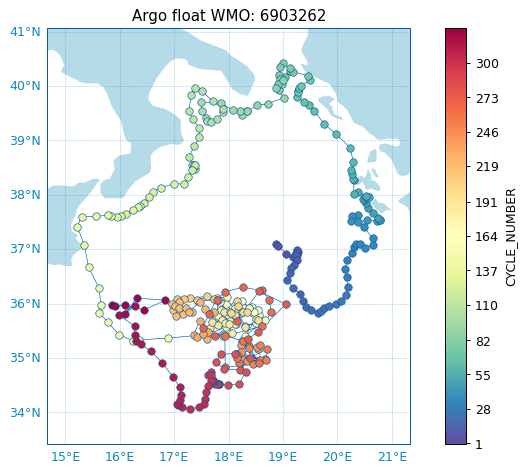
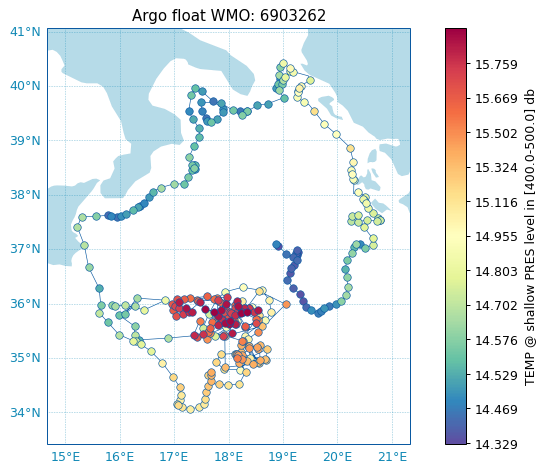
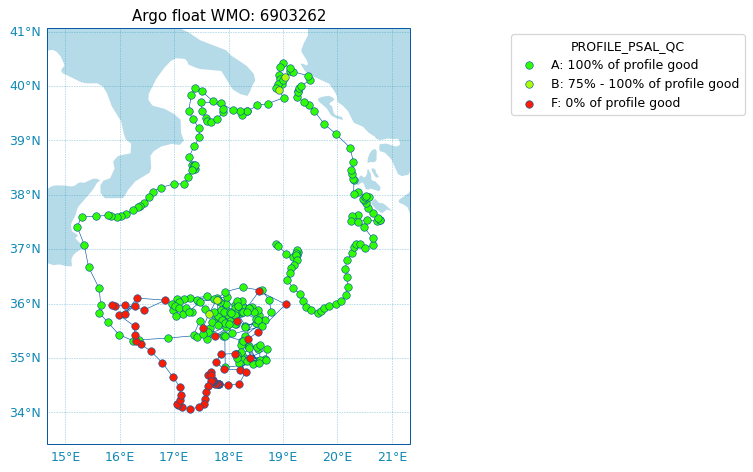
The ArgoFloat class come with a ArgoFloat.plot accessor than can take several methods to quickly visualize data from the float:
Check all the detailed arguments on the API reference ArgoFloat.plot.
from argopy import ArgoFloat
af = ArgoFloat(6903262)

af.plot.trajectory()
# af.plot.trajectory(figsize=(18,18), padding=[1, 5])
from argopy import ArgoFloat
af = ArgoFloat(6903262)

af.plot.map('TEMP', pres=450, cmap='Spectral_r')
from argopy import ArgoFloat
af = ArgoFloat(6903262)

af.plot.map('PROFILE_PSAL_QC')
from argopy import ArgoFloat
af = ArgoFloat(6903262)

af.plot.scatter('TEMP')
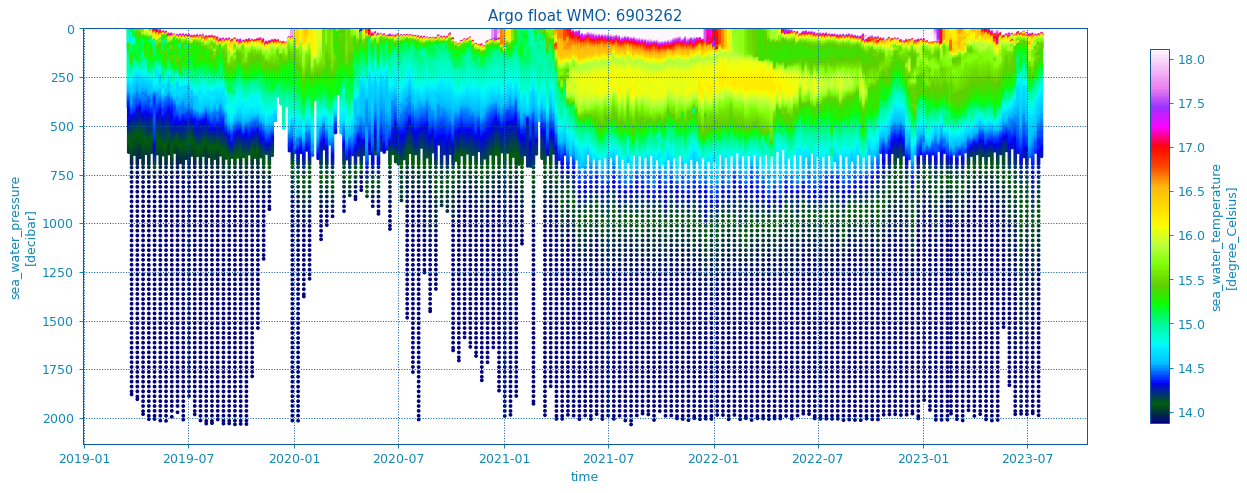
Plotting QC will automatically select the appropriate colormap:
af.plot.scatter('PSAL_QC')
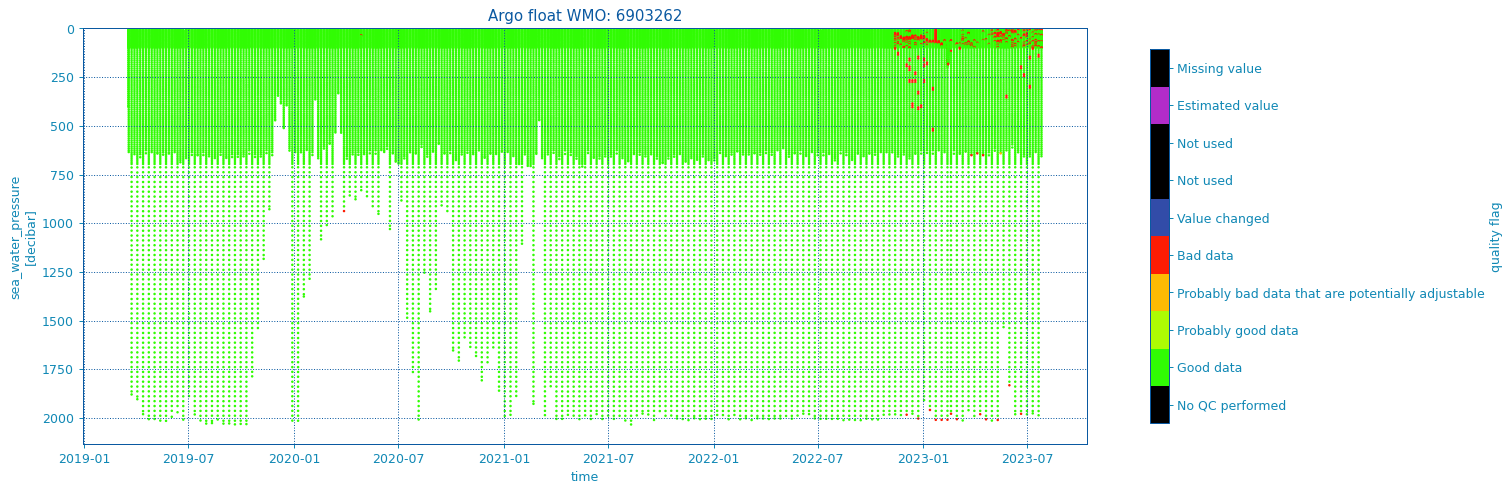
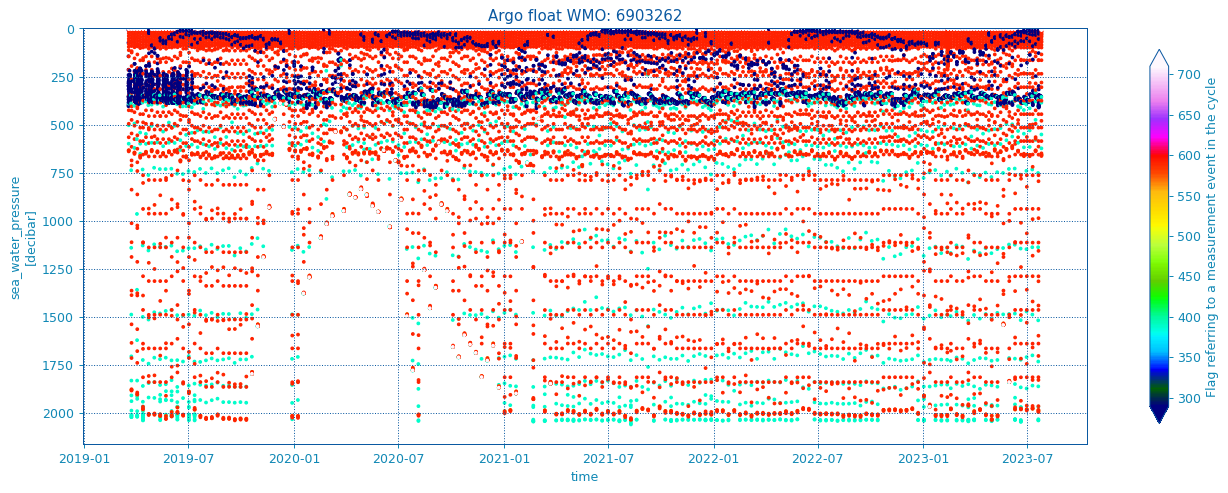
Note that by default, variables are loaded from the prof netcdf dataset, but variables from other netcdf dataset can also be plotted if the appropriate dataset is indicated with the ds argument:
from argopy import ArgoFloat
af = ArgoFloat(6903262)

af.plot.scatter('MEASUREMENT_CODE', ds='Rtraj')
Support for configuration parameters access#
The ArgoFloat object comes with 2 extensions dedicated to easily access/read configuration parameters in operation and at launch-time.
When Argopy is offline, parameters reading rely on a local meta data netcdf file, and when Argopy is online, it relies on the Euro-Argo Fleet-Monitoring web-API.
Operational configuration#
These are facilitated access to the CONFIG_PARAMETER_NAME and CONFIG_PARAMETER_VALUE netcdf parameters.
Get list of parameters and missions:
In [33]: from argopy import ArgoFloat

In [34]: af = ArgoFloat(3902492)

# Total number and list of configuration parameters:
In [35]: af.config.n_params
Out[35]: 12

In [36]: af.config.parameters
Out[36]:
['CONFIG_CtdDescentToParkPhaseDepthZone1SamplingPeriod_seconds',
 'CONFIG_CtdDescentToParkPhaseDepthZone2SamplingPeriod_seconds',
 'CONFIG_CtdDescentToParkPhaseDepthZone3SamplingPeriod_seconds',
 'CONFIG_CycleTime_seconds',
 'CONFIG_EcoDescentToParkPhaseDepthZone1SamplingPeriod_seconds',
 'CONFIG_EcoDescentToParkPhaseDepthZone2SamplingPeriod_seconds',
 'CONFIG_EcoDescentToParkPhaseDepthZone3SamplingPeriod_seconds',
 'CONFIG_OptodeDescentToParkPhaseDepthZone1SamplingPeriod_seconds',
 'CONFIG_OptodeDescentToParkPhaseDepthZone2SamplingPeriod_seconds',
 'CONFIG_OptodeDescentToParkPhaseDepthZone3SamplingPeriod_seconds',
 'CONFIG_ParkPressure_dbar',
 'CONFIG_ProfilePressure_dbar']

# Total number and list of missions:
In [37]: af.config.n_missions
Out[37]: 2

In [38]: af.config.missions
Out[38]: [1, 2]

# Get a dictionary mapping cycle on mission numbers:
In [39]: af.config.cycles
Out[39]: {1: 1, 2: 1, 3: 1, 4: 1, 5: 2, 6: 2, 7: 2, 8: 2}
Or directly read parameter values:
# Read one parameter value, with explicit or implicit parameter name:
# ('CONFIG_' is not mandatory, but string is case-sensitive)
In [40]: af.config['CONFIG_CycleTime_seconds']
Out[40]: [18000.0, 43200.0]

In [41]: af.config['CycleTime_seconds']
Out[41]: [18000.0, 43200.0]

# Read parameter value for one or more mission numbers:
# (! 2nd index is not 0-based, it's an integer key to look for in mission numbers)
In [42]: af.config['CycleTime_seconds', 1]
Out[42]: 18000.0

In [43]: af.config['CycleTime_seconds', 1:3]
Out[43]: [18000.0, 43200.0]

# Read parameter value for one or more cycle numbers:
# (! 2nd index is not 0-based, it's an integer key to look for in cycle numbers)
In [44]: af.config.for_cycles('CycleTime_seconds', 1)
Out[44]: 18000.0

In [45]: af.config.for_cycles('CycleTime_seconds', [5, 6])
Out[45]: [43200.0, 43200.0]
And parameters can also be exported to pandas.DataFrame:
In [46]: af.config.to_dataframe()
Out[46]:
                                                Name  ...                              CONFIG_PARAMETER_NAME
0      CtdDescentToParkPhaseDepthZone1SamplingPeriod  ...  CONFIG_CtdDescentToParkPhaseDepthZone1Sampling...
1      CtdDescentToParkPhaseDepthZone2SamplingPeriod  ...  CONFIG_CtdDescentToParkPhaseDepthZone2Sampling...
2      CtdDescentToParkPhaseDepthZone3SamplingPeriod  ...  CONFIG_CtdDescentToParkPhaseDepthZone3Sampling...
3                                          CycleTime  ...                           CONFIG_CycleTime_seconds
4      EcoDescentToParkPhaseDepthZone1SamplingPeriod  ...  CONFIG_EcoDescentToParkPhaseDepthZone1Sampling...
5      EcoDescentToParkPhaseDepthZone2SamplingPeriod  ...  CONFIG_EcoDescentToParkPhaseDepthZone2Sampling...
6      EcoDescentToParkPhaseDepthZone3SamplingPeriod  ...  CONFIG_EcoDescentToParkPhaseDepthZone3Sampling...
7   OptodeDescentToParkPhaseDepthZone1SamplingPeriod  ...  CONFIG_OptodeDescentToParkPhaseDepthZone1Sampl...
8   OptodeDescentToParkPhaseDepthZone2SamplingPeriod  ...  CONFIG_OptodeDescentToParkPhaseDepthZone2Sampl...
9   OptodeDescentToParkPhaseDepthZone3SamplingPeriod  ...  CONFIG_OptodeDescentToParkPhaseDepthZone3Sampl...
10                                      ParkPressure  ...                           CONFIG_ParkPressure_dbar
11                                   ProfilePressure  ...                        CONFIG_ProfilePressure_dbar

[12 rows x 5 columns]

# or:
# af.config.to_dataframe(missions=1)
# af.config.to_dataframe(missions=[1, 2])
Launch-time configuration#
These are facilitated access to the LAUNCH_CONFIG_PARAMETER_NAME and LAUNCH_CONFIG_PARAMETER_VALUE netcdf parameters.
Get list of parameters:
In [47]: from argopy import ArgoFloat

In [48]: af = ArgoFloat(3902492)

# Total number and list of launch parameters:
In [49]: af.launchconfig.n_params
Out[49]: 317

In [50]: af.launchconfig.parameters
Out[50]:
['CONFIG_AscentEndThreshold_dbar',
 'CONFIG_AscentSpeedFactor_NUMBER',
 'CONFIG_AscentSpeedMin_cm/s',
 'CONFIG_AscentSpeedStartPressureThresholdForSlowPhase_dbar',
 'CONFIG_AscentSpeed_cm/s',
 'CONFIG_BuoyancyReductionFirstThreshold_dbar',
 'CONFIG_BuoyancyReductionSecondThreshold_dbar',
 'CONFIG_CTDPumpStopPressure_dbar',
 'CONFIG_ConnectionTimeOut_seconds',
 'CONFIG_CtdAscentPhaseDepthZone1SamplingPeriod_seconds',
 'CONFIG_CtdAscentPhaseDepthZone2SamplingPeriod_seconds',
 'CONFIG_CtdAscentPhaseDepthZone3SamplingPeriod_seconds',
 'CONFIG_CtdAscentPhaseDepthZone4SamplingPeriod_seconds',
 'CONFIG_CtdAscentPhaseDepthZone5SamplingPeriod_seconds',
 'CONFIG_CtdDepthZone1DataProcessingMode_NUMBER',
 'CONFIG_CtdDepthZone1DataSynchronizationMode_NUMBER',
 'CONFIG_CtdDepthZone1DepthZone2PressureThreshold_dbar',
 'CONFIG_CtdDepthZone1PowerAcquisitionMode_NUMBER',
 'CONFIG_CtdDepthZone1SlicesThickness_dbar',
 'CONFIG_CtdDepthZone2DataProcessingMode_NUMBER',
 'CONFIG_CtdDepthZone2DataSynchronizationMode_NUMBER',
 'CONFIG_CtdDepthZone2DepthZone3PressureThreshold_dbar',
 'CONFIG_CtdDepthZone2PowerAcquisitionMode_NUMBER',
 'CONFIG_CtdDepthZone2SlicesThickness_dbar',
 'CONFIG_CtdDepthZone3DataProcessingMode_NUMBER',
 'CONFIG_CtdDepthZone3DataSynchronizationMode_NUMBER',
 'CONFIG_CtdDepthZone3DepthZone4PressureThreshold_dbar',
 'CONFIG_CtdDepthZone3PowerAcquisitionMode_NUMBER',
 'CONFIG_CtdDepthZone3SlicesThickness_dbar',
 'CONFIG_CtdDepthZone4DataProcessingMode_NUMBER',
 'CONFIG_CtdDepthZone4DataSynchronizationMode_NUMBER',
 'CONFIG_CtdDepthZone4DepthZone5PressureThreshold_dbar',
 'CONFIG_CtdDepthZone4PowerAcquisitionMode_NUMBER',
 'CONFIG_CtdDepthZone4SlicesThickness_dbar',
 'CONFIG_CtdDepthZone5DataProcessingMode_NUMBER',
 'CONFIG_CtdDepthZone5DataSynchronizationMode_NUMBER',
 'CONFIG_CtdDepthZone5PowerAcquisitionMode_NUMBER',
 'CONFIG_CtdDepthZone5SlicesThickness_dbar',
 'CONFIG_CtdDescentToParkPhaseDepthZone1SamplingPeriod_seconds',
 'CONFIG_CtdDescentToParkPhaseDepthZone2SamplingPeriod_seconds',
 'CONFIG_CtdDescentToParkPhaseDepthZone3SamplingPeriod_seconds',
 'CONFIG_CtdDescentToParkPhaseDepthZone4SamplingPeriod_seconds',
 'CONFIG_CtdDescentToParkPhaseDepthZone5SamplingPeriod_seconds',
 'CONFIG_CtdDescentToProfPhaseDepthZone1SamplingPeriod_seconds',
 'CONFIG_CtdDescentToProfPhaseDepthZone2SamplingPeriod_seconds',
 'CONFIG_CtdDescentToProfPhaseDepthZone3SamplingPeriod_seconds',
 'CONFIG_CtdDescentToProfPhaseDepthZone4SamplingPeriod_seconds',
 'CONFIG_CtdDescentToProfPhaseDepthZone5SamplingPeriod_seconds',
 'CONFIG_CtdFirstValidSample_NUMBER',
 'CONFIG_CtdInAirMeasurementSamplingPeriod_seconds',
 'CONFIG_CtdParkDriftPhaseDepthZone1SamplingPeriod_seconds',
 'CONFIG_CtdParkDriftPhaseDepthZone2SamplingPeriod_seconds',
 'CONFIG_CtdParkDriftPhaseDepthZone3SamplingPeriod_seconds',
 'CONFIG_CtdParkDriftPhaseDepthZone4SamplingPeriod_seconds',
 'CONFIG_CtdParkDriftPhaseDepthZone5SamplingPeriod_seconds',
 'CONFIG_CtdPowerSwitchDelayMin_msec',
 'CONFIG_CtdProfDriftPhaseDepthZone1SamplingPeriod_seconds',
 'CONFIG_CtdProfDriftPhaseDepthZone2SamplingPeriod_seconds',
 'CONFIG_CtdProfDriftPhaseDepthZone3SamplingPeriod_seconds',
 'CONFIG_CtdProfDriftPhaseDepthZone4SamplingPeriod_seconds',
 'CONFIG_CtdProfDriftPhaseDepthZone5SamplingPeriod_seconds',
 'CONFIG_CtdWarmUpTime_msec',
 'CONFIG_CycleTime_seconds',
 'CONFIG_DescentSpeedMin_cm/s',
 'CONFIG_DescentSpeed_cm/s',
 'CONFIG_EcoAscentPhaseDepthZone1SamplingPeriod_seconds',
 'CONFIG_EcoAscentPhaseDepthZone2SamplingPeriod_seconds',
 'CONFIG_EcoAscentPhaseDepthZone3SamplingPeriod_seconds',
 'CONFIG_EcoAscentPhaseDepthZone4SamplingPeriod_seconds',
 'CONFIG_EcoAscentPhaseDepthZone5SamplingPeriod_seconds',
 'CONFIG_EcoDepthZone1DataProcessingMode_NUMBER',
 'CONFIG_EcoDepthZone1DataSynchronizationMode_NUMBER',
 'CONFIG_EcoDepthZone1DepthZone2PressureThreshold_dbar',
 'CONFIG_EcoDepthZone1PowerAcquisitionMode_NUMBER',
 'CONFIG_EcoDepthZone1SlicesThickness_dbar',
 'CONFIG_EcoDepthZone2DataProcessingMode_NUMBER',
 'CONFIG_EcoDepthZone2DataSynchronizationMode_NUMBER',
 'CONFIG_EcoDepthZone2DepthZone3PressureThreshold_dbar',
 'CONFIG_EcoDepthZone2PowerAcquisitionMode_NUMBER',
 'CONFIG_EcoDepthZone2SlicesThickness_dbar',
 'CONFIG_EcoDepthZone3DataProcessingMode_NUMBER',
 'CONFIG_EcoDepthZone3DataSynchronizationMode_NUMBER',
 'CONFIG_EcoDepthZone3DepthZone4PressureThreshold_dbar',
 'CONFIG_EcoDepthZone3PowerAcquisitionMode_NUMBER',
 'CONFIG_EcoDepthZone3SlicesThickness_dbar',
 'CONFIG_EcoDepthZone4DataProcessingMode_NUMBER',
 'CONFIG_EcoDepthZone4DataSynchronizationMode_NUMBER',
 'CONFIG_EcoDepthZone4DepthZone5PressureThreshold_dbar',
 'CONFIG_EcoDepthZone4PowerAcquisitionMode_NUMBER',
 'CONFIG_EcoDepthZone4SlicesThickness_dbar',
 'CONFIG_EcoDepthZone5DataProcessingMode_NUMBER',
 'CONFIG_EcoDepthZone5DataSynchronizationMode_NUMBER',
 'CONFIG_EcoDepthZone5PowerAcquisitionMode_NUMBER',
 'CONFIG_EcoDepthZone5SlicesThickness_dbar',
 'CONFIG_EcoDescentToParkPhaseDepthZone1SamplingPeriod_seconds',
 'CONFIG_EcoDescentToParkPhaseDepthZone2SamplingPeriod_seconds',
 'CONFIG_EcoDescentToParkPhaseDepthZone3SamplingPeriod_seconds',
 'CONFIG_EcoDescentToParkPhaseDepthZone4SamplingPeriod_seconds',
 'CONFIG_EcoDescentToParkPhaseDepthZone5SamplingPeriod_seconds',
 'CONFIG_EcoDescentToProfPhaseDepthZone1SamplingPeriod_seconds',
 'CONFIG_EcoDescentToProfPhaseDepthZone2SamplingPeriod_seconds',
 'CONFIG_EcoDescentToProfPhaseDepthZone3SamplingPeriod_seconds',
 'CONFIG_EcoDescentToProfPhaseDepthZone4SamplingPeriod_seconds',
 'CONFIG_EcoDescentToProfPhaseDepthZone5SamplingPeriod_seconds',
 'CONFIG_EcoFirstValidSample_NUMBER',
 'CONFIG_EcoInAirMeasurementSamplingPeriod_seconds',
 'CONFIG_EcoParkDriftPhaseDepthZone1SamplingPeriod_seconds',
 'CONFIG_EcoParkDriftPhaseDepthZone2SamplingPeriod_seconds',
 'CONFIG_EcoParkDriftPhaseDepthZone3SamplingPeriod_seconds',
 'CONFIG_EcoParkDriftPhaseDepthZone4SamplingPeriod_seconds',
 'CONFIG_EcoParkDriftPhaseDepthZone5SamplingPeriod_seconds',
 'CONFIG_EcoPowerSwitchDelayMin_msec',
 'CONFIG_EcoProfDriftPhaseDepthZone1SamplingPeriod_seconds',
 'CONFIG_EcoProfDriftPhaseDepthZone2SamplingPeriod_seconds',
 'CONFIG_EcoProfDriftPhaseDepthZone3SamplingPeriod_seconds',
 'CONFIG_EcoProfDriftPhaseDepthZone4SamplingPeriod_seconds',
 'CONFIG_EcoProfDriftPhaseDepthZone5SamplingPeriod_seconds',
 'CONFIG_EcoWarmUpTime_msec',
 'CONFIG_GPSAcquisitionEndCycle_LOGICAL',
 'CONFIG_GPSAcquisitionEndOfLife_LOGICAL',
 'CONFIG_GPSImprovedLocation_LOGICAL',
 'CONFIG_GPSSetClockSensorCard_LOGICAL',
 'CONFIG_GroundingModeMinPresThreshold_dbar',
 'CONFIG_GroundingModePresAdjustment_dbar',
 'CONFIG_GroundingMode_NUMBER',
 'CONFIG_HangingMode_NUMBER',
 'CONFIG_IceDetectionConsecutiveDetectionBeforeFloatSurfaceInhibition_NUMBER',
 'CONFIG_IceDetectionMixedLayerPMax_dbar',
 'CONFIG_IceDetectionMixedLayerPMin_dbar',
 'CONFIG_IceDetection_degC',
 'CONFIG_InAirMeasurementPeriodicity_NUMBER',
 'CONFIG_InAirMeasurementTime_seconds',
 'CONFIG_MultiParkingPhase_NUMBER',
 'CONFIG_OilVolumeLastPumpActionBuoyancyAcquisition_cm^3',
 'CONFIG_OilVolumeMaxPerPumpActionReposition_cm^3',
 'CONFIG_OilVolumeMaxPerValveAction_cm^3',
 'CONFIG_OilVolumeMinForGroundingDetection_cm^3',
 'CONFIG_OilVolumePerPumpActionAscent_cm^3',
 'CONFIG_OilVolumePerPumpActionDescent_cm^3',
 'CONFIG_OptodeAscentPhaseDepthZone1SamplingPeriod_seconds',
 'CONFIG_OptodeAscentPhaseDepthZone2SamplingPeriod_seconds',
 'CONFIG_OptodeAscentPhaseDepthZone3SamplingPeriod_seconds',
 'CONFIG_OptodeAscentPhaseDepthZone4SamplingPeriod_seconds',
 'CONFIG_OptodeAscentPhaseDepthZone5SamplingPeriod_seconds',
 'CONFIG_OptodeDepthZone1DataProcessingMode_NUMBER',
 'CONFIG_OptodeDepthZone1DataSynchronizationMode_NUMBER',
 'CONFIG_OptodeDepthZone1DepthZone2PressureThreshold_dbar',
 'CONFIG_OptodeDepthZone1PowerAcquisitionMode_NUMBER',
 'CONFIG_OptodeDepthZone1SlicesThickness_dbar',
 'CONFIG_OptodeDepthZone2DataProcessingMode_NUMBER',
 'CONFIG_OptodeDepthZone2DataSynchronizationMode_NUMBER',
 'CONFIG_OptodeDepthZone2DepthZone3PressureThreshold_dbar',
 'CONFIG_OptodeDepthZone2PowerAcquisitionMode_NUMBER',
 'CONFIG_OptodeDepthZone2SlicesThickness_dbar',
 'CONFIG_OptodeDepthZone3DataProcessingMode_NUMBER',
 'CONFIG_OptodeDepthZone3DataSynchronizationMode_NUMBER',
 'CONFIG_OptodeDepthZone3DepthZone4PressureThreshold_dbar',
 'CONFIG_OptodeDepthZone3PowerAcquisitionMode_NUMBER',
 'CONFIG_OptodeDepthZone3SlicesThickness_dbar',
 'CONFIG_OptodeDepthZone4DataProcessingMode_NUMBER',
 'CONFIG_OptodeDepthZone4DataSynchronizationMode_NUMBER',
 'CONFIG_OptodeDepthZone4DepthZone5PressureThreshold_dbar',
 'CONFIG_OptodeDepthZone4PowerAcquisitionMode_NUMBER',
 'CONFIG_OptodeDepthZone4SlicesThickness_dbar',
 'CONFIG_OptodeDepthZone5DataProcessingMode_NUMBER',
 'CONFIG_OptodeDepthZone5DataSynchronizationMode_NUMBER',
 'CONFIG_OptodeDepthZone5PowerAcquisitionMode_NUMBER',
 'CONFIG_OptodeDepthZone5SlicesThickness_dbar',
 'CONFIG_OptodeDescentToParkPhaseDepthZone1SamplingPeriod_seconds',
 'CONFIG_OptodeDescentToParkPhaseDepthZone2SamplingPeriod_seconds',
 'CONFIG_OptodeDescentToParkPhaseDepthZone3SamplingPeriod_seconds',
 'CONFIG_OptodeDescentToParkPhaseDepthZone4SamplingPeriod_seconds',
 'CONFIG_OptodeDescentToParkPhaseDepthZone5SamplingPeriod_seconds',
 'CONFIG_OptodeDescentToProfPhaseDepthZone1SamplingPeriod_seconds',
 'CONFIG_OptodeDescentToProfPhaseDepthZone2SamplingPeriod_seconds',
 'CONFIG_OptodeDescentToProfPhaseDepthZone3SamplingPeriod_seconds',
 'CONFIG_OptodeDescentToProfPhaseDepthZone4SamplingPeriod_seconds',
 'CONFIG_OptodeDescentToProfPhaseDepthZone5SamplingPeriod_seconds',
 'CONFIG_OptodeFirstValidSample_NUMBER',
 'CONFIG_OptodeInAirMeasurementSamplingPeriod_seconds',
 'CONFIG_OptodeParkDriftPhaseDepthZone1SamplingPeriod_seconds',
 'CONFIG_OptodeParkDriftPhaseDepthZone2SamplingPeriod_seconds',
 'CONFIG_OptodeParkDriftPhaseDepthZone3SamplingPeriod_seconds',
 'CONFIG_OptodeParkDriftPhaseDepthZone4SamplingPeriod_seconds',
 'CONFIG_OptodeParkDriftPhaseDepthZone5SamplingPeriod_seconds',
 'CONFIG_OptodePowerSwitchDelayMin_msec',
 'CONFIG_OptodeProfDriftPhaseDepthZone1SamplingPeriod_seconds',
 'CONFIG_OptodeProfDriftPhaseDepthZone2SamplingPeriod_seconds',
 'CONFIG_OptodeProfDriftPhaseDepthZone3SamplingPeriod_seconds',
 'CONFIG_OptodeProfDriftPhaseDepthZone4SamplingPeriod_seconds',
 'CONFIG_OptodeProfDriftPhaseDepthZone5SamplingPeriod_seconds',
 'CONFIG_OptodeWarmUpTime_msec',
 'CONFIG_ParkPressure_dbar',
 'CONFIG_PressureCheckTimeAscent_seconds',
 'CONFIG_PressureCheckTimeDescent_seconds',
 'CONFIG_PressureCheckTimeParking_seconds',
 'CONFIG_PressureOffsetSampledAfterTransmission_LOGICAL',
 'CONFIG_PressureTargetToleranceBeforeReposition_dbar',
 'CONFIG_PressureTargetToleranceDuringDrift_dbar',
 'CONFIG_PressureTargetToleranceForStabilisationDuringAscent_dbar',
 'CONFIG_PressureTargetToleranceForStabilisation_dbar',
 'CONFIG_ProfileEvasionBrakingFactor_NUMBER',
 'CONFIG_ProfilePressure_dbar',
 'CONFIG_SfetAscentPhaseDepthZone1SamplingPeriod_seconds',
 'CONFIG_SfetAscentPhaseDepthZone2SamplingPeriod_seconds',
 'CONFIG_SfetAscentPhaseDepthZone3SamplingPeriod_seconds',
 'CONFIG_SfetAscentPhaseDepthZone4SamplingPeriod_seconds',
 'CONFIG_SfetAscentPhaseDepthZone5SamplingPeriod_seconds',
 'CONFIG_SfetDepthZone1DataProcessingMode_NUMBER',
 'CONFIG_SfetDepthZone1DataSynchronizationMode_NUMBER',
 'CONFIG_SfetDepthZone1DepthZone2PressureThreshold_dbar',
 'CONFIG_SfetDepthZone1PowerAcquisitionMode_NUMBER',
 'CONFIG_SfetDepthZone1SlicesThickness_dbar',
 'CONFIG_SfetDepthZone2DataProcessingMode_NUMBER',
 'CONFIG_SfetDepthZone2DataSynchronizationMode_NUMBER',
 'CONFIG_SfetDepthZone2DepthZone3PressureThreshold_dbar',
 'CONFIG_SfetDepthZone2PowerAcquisitionMode_NUMBER',
 'CONFIG_SfetDepthZone2SlicesThickness_dbar',
 'CONFIG_SfetDepthZone3DataProcessingMode_NUMBER',
 'CONFIG_SfetDepthZone3DataSynchronizationMode_NUMBER',
 'CONFIG_SfetDepthZone3DepthZone4PressureThreshold_dbar',
 'CONFIG_SfetDepthZone3PowerAcquisitionMode_NUMBER',
 'CONFIG_SfetDepthZone3SlicesThickness_dbar',
 'CONFIG_SfetDepthZone4DataProcessingMode_NUMBER',
 'CONFIG_SfetDepthZone4DataSynchronizationMode_NUMBER',
 'CONFIG_SfetDepthZone4DepthZone5PressureThreshold_dbar',
 'CONFIG_SfetDepthZone4PowerAcquisitionMode_NUMBER',
 'CONFIG_SfetDepthZone4SlicesThickness_dbar',
 'CONFIG_SfetDepthZone5DataProcessingMode_NUMBER',
 'CONFIG_SfetDepthZone5DataSynchronizationMode_NUMBER',
 'CONFIG_SfetDepthZone5PowerAcquisitionMode_NUMBER',
 'CONFIG_SfetDepthZone5SlicesThickness_dbar',
 'CONFIG_SfetDescentToParkPhaseDepthZone1SamplingPeriod_seconds',
 'CONFIG_SfetDescentToParkPhaseDepthZone2SamplingPeriod_seconds',
 'CONFIG_SfetDescentToParkPhaseDepthZone3SamplingPeriod_seconds',
 'CONFIG_SfetDescentToParkPhaseDepthZone4SamplingPeriod_seconds',
 'CONFIG_SfetDescentToParkPhaseDepthZone5SamplingPeriod_seconds',
 'CONFIG_SfetDescentToProfPhaseDepthZone1SamplingPeriod_seconds',
 'CONFIG_SfetDescentToProfPhaseDepthZone2SamplingPeriod_seconds',
 'CONFIG_SfetDescentToProfPhaseDepthZone3SamplingPeriod_seconds',
 'CONFIG_SfetDescentToProfPhaseDepthZone4SamplingPeriod_seconds',
 'CONFIG_SfetDescentToProfPhaseDepthZone5SamplingPeriod_seconds',
 'CONFIG_SfetFirstValidSample_NUMBER',
 'CONFIG_SfetInAirMeasurementSamplingPeriod_seconds',
 'CONFIG_SfetParkDriftPhaseDepthZone1SamplingPeriod_seconds',
 'CONFIG_SfetParkDriftPhaseDepthZone2SamplingPeriod_seconds',
 'CONFIG_SfetParkDriftPhaseDepthZone3SamplingPeriod_seconds',
 'CONFIG_SfetParkDriftPhaseDepthZone4SamplingPeriod_seconds',
 'CONFIG_SfetParkDriftPhaseDepthZone5SamplingPeriod_seconds',
 'CONFIG_SfetPowerSwitchDelayMin_msec',
 'CONFIG_SfetProfDriftPhaseDepthZone1SamplingPeriod_seconds',
 'CONFIG_SfetProfDriftPhaseDepthZone2SamplingPeriod_seconds',
 'CONFIG_SfetProfDriftPhaseDepthZone3SamplingPeriod_seconds',
 'CONFIG_SfetProfDriftPhaseDepthZone4SamplingPeriod_seconds',
 'CONFIG_SfetProfDriftPhaseDepthZone5SamplingPeriod_seconds',
 'CONFIG_SfetWarmUpTime_msec',
 'CONFIG_SunaApfFrameOutputPixelBegin_NUMBER',
 'CONFIG_SunaApfFrameOutputPixelEnd_NUMBER',
 'CONFIG_SunaAscentPhaseDepthZone1SamplingPeriod_seconds',
 'CONFIG_SunaAscentPhaseDepthZone2SamplingPeriod_seconds',
 'CONFIG_SunaAscentPhaseDepthZone3SamplingPeriod_seconds',
 'CONFIG_SunaAscentPhaseDepthZone4SamplingPeriod_seconds',
 'CONFIG_SunaAscentPhaseDepthZone5SamplingPeriod_seconds',
 'CONFIG_SunaDepthZone1DataProcessingMode_NUMBER',
 'CONFIG_SunaDepthZone1DataSynchronizationMode_NUMBER',
 'CONFIG_SunaDepthZone1DepthZone2PressureThreshold_dbar',
 'CONFIG_SunaDepthZone1PowerAcquisitionMode_NUMBER',
 'CONFIG_SunaDepthZone1SlicesThickness_dbar',
 'CONFIG_SunaDepthZone2DataProcessingMode_NUMBER',
 'CONFIG_SunaDepthZone2DataSynchronizationMode_NUMBER',
 'CONFIG_SunaDepthZone2DepthZone3PressureThreshold_dbar',
 'CONFIG_SunaDepthZone2PowerAcquisitionMode_NUMBER',
 'CONFIG_SunaDepthZone2SlicesThickness_dbar',
 'CONFIG_SunaDepthZone3DataProcessingMode_NUMBER',
 'CONFIG_SunaDepthZone3DataSynchronizationMode_NUMBER',
 'CONFIG_SunaDepthZone3DepthZone4PressureThreshold_dbar',
 'CONFIG_SunaDepthZone3PowerAcquisitionMode_NUMBER',
 'CONFIG_SunaDepthZone3SlicesThickness_dbar',
 'CONFIG_SunaDepthZone4DataProcessingMode_NUMBER',
 'CONFIG_SunaDepthZone4DataSynchronizationMode_NUMBER',
 'CONFIG_SunaDepthZone4DepthZone5PressureThreshold_dbar',
 'CONFIG_SunaDepthZone4PowerAcquisitionMode_NUMBER',
 'CONFIG_SunaDepthZone4SlicesThickness_dbar',
 'CONFIG_SunaDepthZone5DataProcessingMode_NUMBER',
 'CONFIG_SunaDepthZone5DataSynchronizationMode_NUMBER',
 'CONFIG_SunaDepthZone5PowerAcquisitionMode_NUMBER',
 'CONFIG_SunaDepthZone5SlicesThickness_dbar',
 'CONFIG_SunaDescentToParkPhaseDepthZone1SamplingPeriod_seconds',
 'CONFIG_SunaDescentToParkPhaseDepthZone2SamplingPeriod_seconds',
 'CONFIG_SunaDescentToParkPhaseDepthZone3SamplingPeriod_seconds',
 'CONFIG_SunaDescentToParkPhaseDepthZone4SamplingPeriod_seconds',
 'CONFIG_SunaDescentToParkPhaseDepthZone5SamplingPeriod_seconds',
 'CONFIG_SunaDescentToProfPhaseDepthZone1SamplingPeriod_seconds',
 'CONFIG_SunaDescentToProfPhaseDepthZone2SamplingPeriod_seconds',
 'CONFIG_SunaDescentToProfPhaseDepthZone3SamplingPeriod_seconds',
 'CONFIG_SunaDescentToProfPhaseDepthZone4SamplingPeriod_seconds',
 'CONFIG_SunaDescentToProfPhaseDepthZone5SamplingPeriod_seconds',
 'CONFIG_SunaFirstValidSample_NUMBER',
 'CONFIG_SunaInAirMeasurementSamplingPeriod_seconds',
 'CONFIG_SunaParkDriftPhaseDepthZone1SamplingPeriod_seconds',
 'CONFIG_SunaParkDriftPhaseDepthZone2SamplingPeriod_seconds',
 'CONFIG_SunaParkDriftPhaseDepthZone3SamplingPeriod_seconds',
 'CONFIG_SunaParkDriftPhaseDepthZone4SamplingPeriod_seconds',
 'CONFIG_SunaParkDriftPhaseDepthZone5SamplingPeriod_seconds',
 'CONFIG_SunaPowerSwitchDelayMin_msec',
 'CONFIG_SunaProfDriftPhaseDepthZone1SamplingPeriod_seconds',
 'CONFIG_SunaProfDriftPhaseDepthZone2SamplingPeriod_seconds',
 'CONFIG_SunaProfDriftPhaseDepthZone3SamplingPeriod_seconds',
 'CONFIG_SunaProfDriftPhaseDepthZone4SamplingPeriod_seconds',
 'CONFIG_SunaProfDriftPhaseDepthZone5SamplingPeriod_seconds',
 'CONFIG_SunaVerticalPressureOffset_dbar',
 'CONFIG_SunaWarmUpTime_msec',
 'CONFIG_TelemetryAutoTestAtDeployment_LOGICAL',
 'CONFIG_TransmissionEndCycle_LOGICAL',
 'CONFIG_TransmissionPeriodEndOfLife_seconds',
 'CONFIG_ValveActionPeriodFactorBuoyancyReduction_NUMBER',
 'CONFIG_ValveTimeActionBuoyancyReduction_csec']
Or directly read parameter values:
# Read one parameter value, with explicit or implicit parameter name:
# ('CONFIG_' is not mandatory, but string is case-sensitive)
In [51]: af.launchconfig['CONFIG_CycleTime_seconds']
Out[51]: 18000.0

In [52]: af.launchconfig['CycleTime_seconds']
Out[52]: 18000.0
And launch parameters can also be exported to pandas.DataFrame:
In [53]: af.launchconfig.to_dataframe()
Out[53]:
                                              Name  ...                              CONFIG_PARAMETER_NAME
0                               AscentEndThreshold  ...                     CONFIG_AscentEndThreshold_dbar
1                                      AscentSpeed  ...                            CONFIG_AscentSpeed_cm/s
2                                AscentSpeedFactor  ...                    CONFIG_AscentSpeedFactor_NUMBER
3                                   AscentSpeedMin  ...                         CONFIG_AscentSpeedMin_cm/s
4    AscentSpeedStartPressureThresholdForSlowPhase  ...  CONFIG_AscentSpeedStartPressureThresholdForSlo...
..                                             ...  ...                                                ...
312                  TelemetryAutoTestAtDeployment  ...       CONFIG_TelemetryAutoTestAtDeployment_LOGICAL
313                           TransmissionEndCycle  ...                CONFIG_TransmissionEndCycle_LOGICAL
314                    TransmissionPeriodEndOfLife  ...         CONFIG_TransmissionPeriodEndOfLife_seconds
315       ValveActionPeriodFactorBuoyancyReduction  ...  CONFIG_ValveActionPeriodFactorBuoyancyReductio...
316               ValveTimeActionBuoyancyReduction  ...       CONFIG_ValveTimeActionBuoyancyReduction_csec

[317 rows x 4 columns]
Note
Note the tab completion for parameter names is available when executed with ipython (eg: jupyter notebooks) to easily get parameter names: just press tab when typing af.launchconfig[' and af.config[':