
Argo Index store#
If you are familiar with Argo index csv files, you may be interested in using directly the Argo index store ArgoIndex.
If Pyarrow is installed, this store will rely on pyarrow.Table as internal storage format for the index, otherwise it will fall back on pandas.DataFrame. Loading the full Argo profile index takes about 2/3 secs with Pyarrow, while it can take up to 6/7 secs with Pandas.
All index store methods and properties are documented in the ArgoIndex API page.
Index file supported#
The table below summarize the argopy support status of all Argo index files:
Index file |
Supported |
|
|---|---|---|
Profile |
ar_index_global_prof.txt |
✅ |
Synthetic-Profile |
argo_synthetic-profile_index.txt |
✅ |
Bio-Profile |
argo_bio-profile_index.txt |
✅ |
Metadata |
ar_index_global_meta.txt |
✅ |
Auxiliary |
etc/argo-index/argo_aux-profile_index.txt |
✅ |
Trajectory |
ar_index_global_traj.txt |
❌ |
Bio-Trajectory |
argo_bio-traj_index.txt |
❌ |
Technical |
ar_index_global_tech.txt |
❌ |
Greylist |
ar_greylist.txt |
❌ |
Index files support can be added on demand. Click here to raise an issue if you’d like to access other index files.
Create an Index store#
You can create an index store with two arguments: a GDAC host (local or remote) and an index file name. Both arguments have default values to the http Ifremer GDAC and core index.
In [1]: from argopy import ArgoIndex

In [2]: idx = ArgoIndex()

# or:
# ArgoIndex(index_file="argo_bio-profile_index.txt")
# ArgoIndex(index_file="bgc-s")  # can use keyword instead of file name: core, bgc-b, bgc-b
# ArgoIndex(host="ftp://ftp.ifremer.fr/ifremer/argo")
# ArgoIndex(host="https://data-argo.ifremer.fr", index_file="core")
# ArgoIndex(host="https://data-argo.ifremer.fr", index_file="ar_index_global_prof.txt", cache=True)
You can also use the following shortcuts:
Load the Index#
All ArgoIndex methods will automatically trigger the index content download if necessary.
You can use the cache=True option if you want to limit the number of download to only one per day (the default cache expiration delay is 24 hours). There is no caching by default.
You can also trigger the index content download in memory with:
In [3]: idx.load()  # Load the full index in memory
Out[3]:
<argoindex.pyarrow>
Host: https://data-argo.ifremer.fr
Index: ar_index_global_prof.txt.gz
Convention: ar_index_global_prof (Profile directory file of the Argo GDAC)
In memory: True (3422692 records)
Searched: False

# or
# idx.load(nrows=1000)  # Only load the first N rows of the index
Full Index properties#
Once you loaded data to a ArgoIndex instance, the following attributes and methods are available:
# Shortcut for length of 1st dimension of the index array
idx.N_RECORDS

# Convert index to a user-friendly Argo csv-like :class:`pandas.DataFrame`
idx.to_dataframe(index=True)

# Only returns the first nrows of the index
idx.to_dataframe(index=True, nrows=2)

# Access internal storage structure of the full index (:class:`pyarrow.Table` or :class:`pandas.DataFrame`)
idx.index

# List of absolute path to files from the full index table column 'file'
idx.uri_full_index
You can also list unique properties, see List unique Index properties below.
Search the Index#
If you need to reduce the list of files from an index, notably those matching a set of search criteria, you can use the ArgoIndex.query extension.
For instance, to reduce the list of files to those with latitude, longitude and date within a rectangular box:
In [4]: idx.query.box([-60, -55, 40., 45., '2007-08-01', '2007-09-01'])
Out[4]:
<argoindex.pyarrow>
Host: https://data-argo.ifremer.fr
Index: ar_index_global_prof.txt.gz
Convention: ar_index_global_prof (Profile directory file of the Argo GDAC)
In memory: True (3422692 records)
Searched: True (12 matches, 0.0004%) - {'BOX': [-60, -55, 40.0, 45.0, '2007-08-01', '2007-09-01']}
Here is the list of methods available to search an index:
idx.query.wmo(1901393)
idx.query.wmo([6902915, 1901393])
idx.query.cyc(1)
idx.query.cyc([1, 12])
idx.query.wmo_cyc(1901393, [1,12])

idx.query.lon([-60, -55, 40., 45., '2007-08-01', '2007-09-01'])  # Take an index BOX definition, only lat/lon is used
idx.query.lat([-60, -55, 40., 45., '2007-08-01', '2007-09-01'])  # Take an index BOX definition, only lat/lon is used
idx.query.date([-60, -55, 40., 45., '2007-08-01', '2007-09-01'])  # Take an index BOX definition, only time is used

idx.query.wmo_cyc(1901393, [1,12])
idx.query.lon_lat([-60, -55, 40., 45., '2007-08-01', '2007-09-01'])  # Take an index BOX definition, only lat/lon is used
idx.query.box([-60, -55, 40., 45., '2007-08-01', '2007-09-01'])  # Take an index BOX definition

idx.query.params(['C1PHASE_DOXY', 'DOWNWELLING_PAR'])  # Only for BGC profile index
idx.query.parameter_data_mode({'BBP700': 'D'})  # Only for BGC profile index

idx.query.profiler_type(845)
idx.query.profiler_type([845, 856])
idx.query.profiler_label('NINJA')
idx.query.profiler_label(['NINJA', 'SOLO-D deep'])

idx.query.institution_code('IF')
idx.query.institution_code(['IF', 'JA'])
idx.query.institution_name('Canada')
idx.query.institution_name(['Canada', 'INCOIS'])
idx.query.dac('coriolis')
idx.query.dac(['meds', 'aoml'])
You will note that the space/time search methods lon, lat, date, lon_lat and box all take the same argument that is a list with [lon_min, lon_max, lat_min, lat_max, datim_min, datim_max] values.
If you need to compose a query with several search criteria, you can use the ArgoIndex.query.compose() method like this:
idx.query.compose({'box': BOX, 'wmo': WMOs})
idx.query.compose({'box': BOX, 'params': 'DOXY'})
idx.query.compose({'box': BOX, 'params': (['DOXY', 'DOXY2'], {'logical': 'and'})})
idx.query.compose({'params': 'DOXY', 'profiler_label': 'ARVOR'})
Once you performed a query on a ArgoIndex instance, the following attributes and methods are available:
idx.N_MATCH  # Shortcut for length of 1st dimension of the search results array
idx.to_dataframe()  # Convert search results to a user-friendly Argo csv-like :class:`pandas.DataFrame`
idx.to_dataframe(nrows=2)  # Only returns the first nrows of the search results
idx.to_indexfile("search_index.txt")  # Export search results to Argo standard index file format
idx.search  #  internal storage structure of the search-reduced index (:class:`pyarrow.Table` or :class:`pandas.DataFrame`)
idx.uri  # List of absolute path to files from the search results table column 'file'
List unique Index properties#
It is often useful to be able to list unique occurrences of some index properties. These are available:
idx.read_wmo()
idx.read_dac_wmo()
idx.read_params()
idx.read_domain()
idx.read_files()

idx.records_per_wmo()
Hint
Each of these methods will use the search result by default, and if no search was ran, will fall back on using the full index.
Specifics to bgc Index#
The argopy index store supports the Bio, Synthetic and Auxiliary Profile directory files:
In [5]: idx = ArgoIndex(index_file="bgc-b").load()

# idx = ArgoIndex(index_file="bgc-s").load()
In [6]: idx
Out[6]:
<argoindex.pyarrow>
Host: https://data-argo.ifremer.fr
Index: argo_bio-profile_index.txt.gz
Convention: argo_bio-profile_index (Bio-Profile directory file of the Argo GDAC)
In memory: True (415365 records)
Searched: False
All methods presented above are valid with a BGC index, but a BGC index store comes with additional search possibilities for parameters and parameter data modes.
Two specific index variables are only available with BGC-Argo index files: PARAMETERS and PARAMETER_DATA_MODE. We thus implemented the ArgoIndex.query.params() and ArgoIndex.query.parameter_data_mode() methods. These method allow to search for (i) profiles with one or more specific parameters and (ii) profiles with parameters in one or more specific data modes.
Syntax for ArgoIndex.query.params()
In [7]: from argopy import ArgoIndex

In [8]: idx = ArgoIndex(index_file='bgc-s').load()

In [9]: idx
Out[9]:
<argoindex.pyarrow>
Host: https://data-argo.ifremer.fr
Index: argo_synthetic-profile_index.txt.gz
Convention: argo_synthetic-profile_index (Synthetic-Profile directory file of the Argo GDAC)
In memory: True (411451 records)
Searched: False
You can search for one parameter:
In [10]: idx.query.params('DOXY')
Out[10]:
<argoindex.pyarrow>
Host: https://data-argo.ifremer.fr
Index: argo_synthetic-profile_index.txt.gz
Convention: argo_synthetic-profile_index (Synthetic-Profile directory file of the Argo GDAC)
In memory: True (411451 records)
Searched: True (395654 matches, 96.1607%) - {'PARAMS': (['DOXY'], 'and')}
Or you can search for several parameters:
In [11]: idx.query.params(['DOXY', 'CDOM'])
Out[11]:
<argoindex.pyarrow>
Host: https://data-argo.ifremer.fr
Index: argo_synthetic-profile_index.txt.gz
Convention: argo_synthetic-profile_index (Synthetic-Profile directory file of the Argo GDAC)
In memory: True (411451 records)
Searched: True (77445 matches, 18.8224%) - {'PARAMS': (['DOXY', 'CDOM'], 'and')}
Note that a multiple parameters search will return profiles with all parameters. To search for profiles with any of the parameters, use:
In [12]: idx.query.params(['DOXY', 'CDOM'], logical='or')
Out[12]:
<argoindex.pyarrow>
Host: https://data-argo.ifremer.fr
Index: argo_synthetic-profile_index.txt.gz
Convention: argo_synthetic-profile_index (Synthetic-Profile directory file of the Argo GDAC)
In memory: True (411451 records)
Searched: True (409636 matches, 99.5589%) - {'PARAMS': (['DOXY', 'CDOM'], 'or')}
Syntax for ArgoIndex.query.parameter_data_mode()
In [13]: from argopy import ArgoIndex

In [14]: idx = ArgoIndex(index_file='bgc-b').load()

In [15]: idx
Out[15]:
<argoindex.pyarrow>
Host: https://data-argo.ifremer.fr
Index: argo_bio-profile_index.txt.gz
Convention: argo_bio-profile_index (Bio-Profile directory file of the Argo GDAC)
In memory: True (415365 records)
Searched: False
You can search one mode for a single parameter:
In [16]: idx.query.parameter_data_mode({'BBP700': 'D'})
Out[16]:
<argoindex.pyarrow>
Host: https://data-argo.ifremer.fr
Index: argo_bio-profile_index.txt.gz
Convention: argo_bio-profile_index (Bio-Profile directory file of the Argo GDAC)
In memory: True (415365 records)
Searched: True (17913 matches, 4.3126%) - {'DMODE': ({'BBP700': ['D']}, 'and')}
You can search several modes for a single parameter:
In [17]: idx.query.parameter_data_mode({'DOXY': ['R', 'A']})
Out[17]:
<argoindex.pyarrow>
Host: https://data-argo.ifremer.fr
Index: argo_bio-profile_index.txt.gz
Convention: argo_bio-profile_index (Bio-Profile directory file of the Argo GDAC)
In memory: True (415365 records)
Searched: True (123461 matches, 29.7235%) - {'DMODE': ({'DOXY': ['R', 'A']}, 'and')}
You can search several modes for several parameters:
In [18]: idx.query.parameter_data_mode({'BBP700': 'D', 'DOXY': 'D'}, logical='and')
Out[18]:
<argoindex.pyarrow>
Host: https://data-argo.ifremer.fr
Index: argo_bio-profile_index.txt.gz
Convention: argo_bio-profile_index (Bio-Profile directory file of the Argo GDAC)
In memory: True (415365 records)
Searched: True (11766 matches, 2.8327%) - {'DMODE': ({'BBP700': ['D'], 'DOXY': ['D']}, 'and')}
And mix all of these as you wish:
In [19]: idx.query.parameter_data_mode({'BBP700': ['R', 'A'], 'DOXY': 'D'}, logical='or')
Out[19]:
<argoindex.pyarrow>
Host: https://data-argo.ifremer.fr
Index: argo_bio-profile_index.txt.gz
Convention: argo_bio-profile_index (Bio-Profile directory file of the Argo GDAC)
In memory: True (415365 records)
Searched: True (334353 matches, 80.4962%) - {'DMODE': ({'BBP700': ['R', 'A'], 'DOXY': ['D']}, 'or')}
Plotting features#
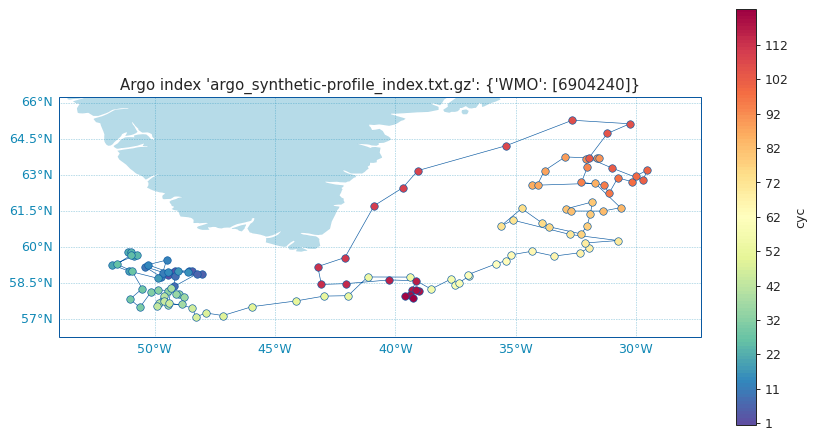
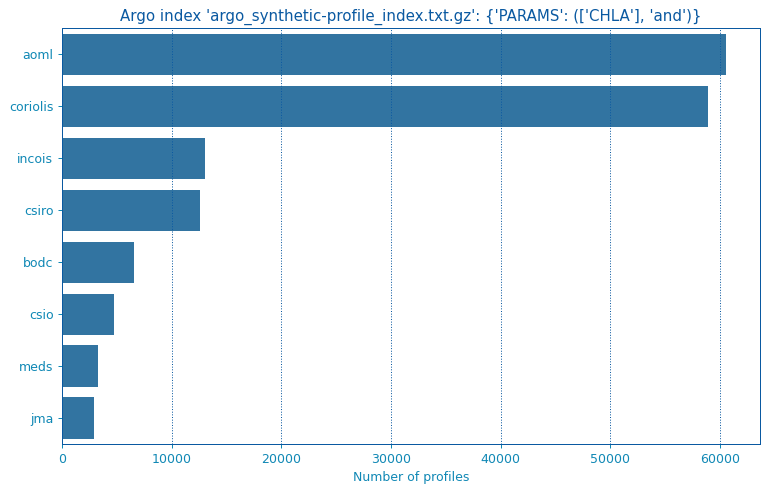
The ArgoIndex class come with a ArgoIndex.plot accessor than can take several methods to quickly visualize data from the float.
Check all the detailed arguments on the API reference ArgoIndex.plot.
from argopy import ArgoIndex
idx = ArgoIndex(index_file='bgc-s')

idx.query.wmo('6904240')
idx.plot.trajectory()
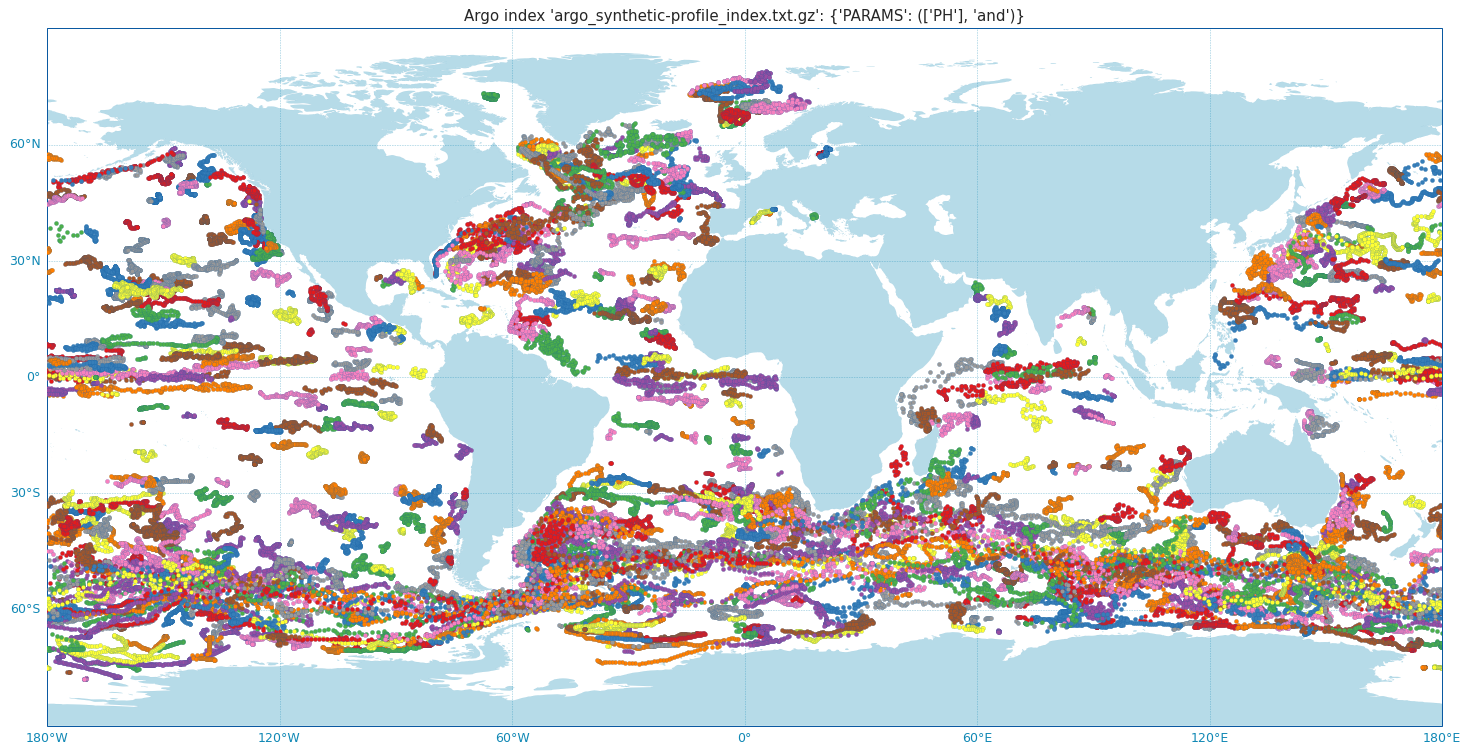
Also with much more floats:
from argopy import ArgoIndex
idx = ArgoIndex(index_file='bgc-s')

idx.query.params('PH')
idx.plot.trajectory(set_global=True,
                    add_legend=False,
                    traj=False,
                    cbar=False,
                    markersize=12,
                    markeredgesize=0.1,
                    dpi=120,
                    figsize=(20,20));
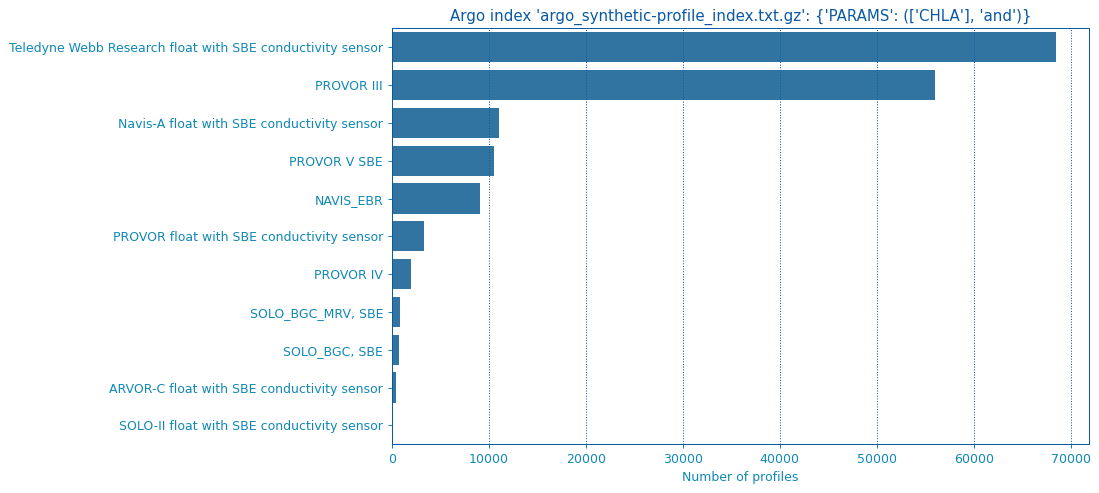
from argopy import ArgoIndex
idx = ArgoIndex(index_file='bgc-s')
idx.query.params('CHLA')

idx.plot.bar(by='profiler')
from argopy import ArgoIndex
idx = ArgoIndex(index_file='bgc-s')
idx.query.params('CHLA')

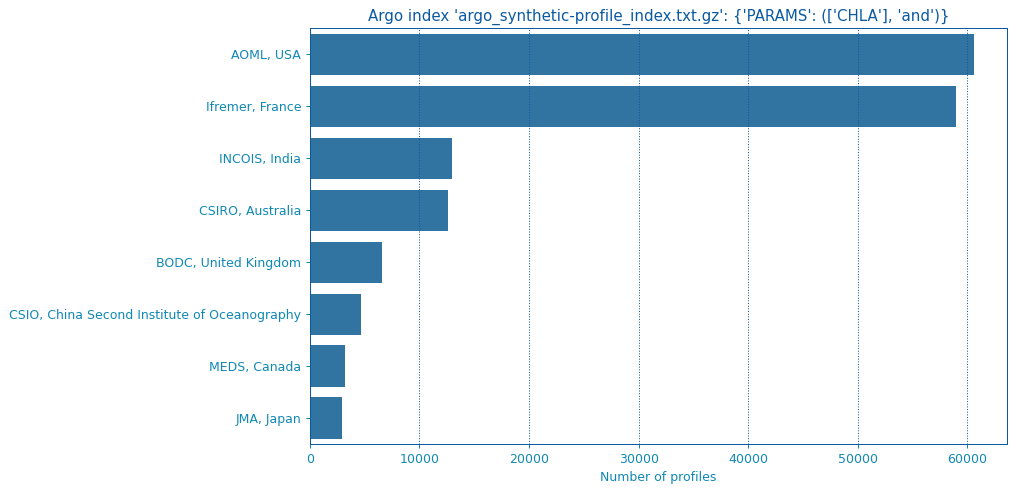
idx.plot.bar(by='dac')
from argopy import ArgoIndex
idx = ArgoIndex(index_file='bgc-s')
idx.query.params('CHLA')

idx.plot.bar(by='institution')